
Festtags-Card-Editor
Version 0.1.12 · Editor DE/EN · Documentation DE/EN/FR.
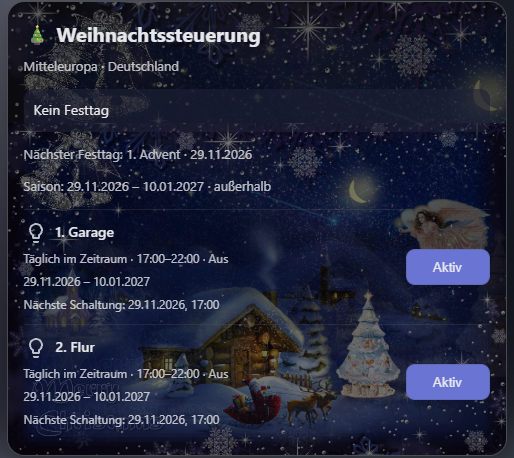
Example from a configured dashboard. The background artwork is supplied by the user and is not included in the app package. The screenshot cannot show the falling snow in motion.
Features
- Select region/country: 47 countries and custom dates, western/Julian traditions.
- Up to five targets (
light,switch,input_boolean), each with individual on/off times. - Daily within a range or on selected observances; annual Advent dates and year rollover are automatic.
- Default season: first Advent Sunday through January 10 inclusive. Pause states persist across restarts.
- Current/next observance and next-switch sensors, plus a dashboard card.
- Optional live status icon:
mdi:lightbulbfor on,mdi:lightbulb-outlinefor off.
Country presets suggest observances and customs, not a complete statutory holiday calendar. First/Second Christmas Day, Saint Stephen's Day, Sinterklaas, Pakjesavond, Three Kings and Epiphany are separate entries. Some share a date.
Installation and updates
- Create a full HA backup and add/refresh the UGSo app repository.
- Install/update and start Festtags-Card-Editor. Architectures: aarch64 and amd64.
- Restart Home Assistant itself, not just the editor app, to load the updated integration.
- Open the editor. On first installation select Set up integration. Configure country, targets and times, then save.
- Select Register card resource and fully reload the dashboard.
type: custom:weihnachtssteuerung-card
title: Christmas controlExisting settings and user pictures are preserved. Scheduling runs inside HA Core even when the editor app is stopped. Administrators access the editor through Ingress. Search targets by name, ID, area or device.
Own pictures and backgrounds
No artwork is bundled. Use your own files with appropriate usage rights.
| Purpose | HA directory | URL path |
|---|---|---|
| Pictures per country/observance | /config/www/weihnachtssteuerung/bilder | /local/weihnachtssteuerung/bilder |
| Backgrounds and decorations | /config/www/weihnachtssteuerung/background | /local/weihnachtssteuerung/background |
Upload PNG, JPG, WebP or GIF (maximum 5 MiB/16 megapixels); animations remain unchanged. Existing SVG files can be assigned, but not uploaded. Duplicate filenames are suffixed rather than overwritten. Unassign/No file only removes the mapping.
Observance pictures appear 110 px high in the card, preserving aspect ratio; editor previews are 90 × 90 px. Several pictures can appear together. Background and decoration have independent transparency, size and X/Y position. Transparency 0% = visible, 100% = invisible; X/Y 0/0 = top left, 100/100 = bottom right. Darkening improves readability. Text and buttons remain usable above the effects.
Snowfall
- Select Snowfall or Image + snowfall. A separate GIF decoration can also be enabled.
- 6–40 particles; actual circular diameter 1–20 CSS pixels, default 4 px.
- Animate snowfall anyway explicitly overrides reduced motion for this card only. Off by default.
- Animation still pauses offscreen or when the page is hidden.
- Save settings; after a card-file update register the resource and reload the dashboard.
Confirmed Chrome test on November 25, 2026
On one HA installation with card 0.1.12, a loaded GIF and 30 simultaneously animated snowflakes were confirmed. Particle position changed between two observations; animation snow-fall, state running. No settings were changed during this combination test. This is not a performance guarantee for all tablets.
Firefox animates but Chrome does not: In the observed case Chrome still loaded the 0.1.8 resource. Reloading alone did not replace the old resource reference. Use Register card resource in the current editor, then fully reload the dashboard. With reduced motion enabled, also save the explicit override. The visible card resumes once the current file and the override are effective.