
ioBroker Blockly
Blockly is the graphical script editor of the ioBroker JavaScript adapter. Automations are built from blocks without having to write all JavaScript code by hand.
Official documentation
This page only gives a short introduction. The complete description of all blocks and more examples are available in the official ioBroker documentation.
Official Sources
- ioBroker.javascript - official repository
- German JavaScript adapter documentation
- Complete Blockly documentation
Example 1: Switch a Data Point Based on Another Data Point
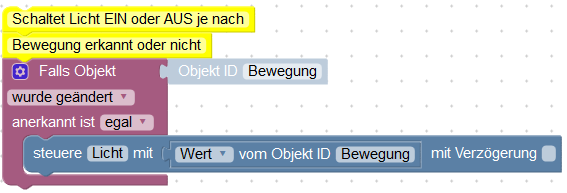
The official starter example shows a typical motion detection workflow:
- A motion data point is used as the trigger.
- On a state change, a light data point is controlled.
- The current value of the motion detector is passed to the light data point.
- Motion turns the light on.
- No motion turns the light off again.
Required Blockly Blocks
1. Trigger
Use the If object block from the Trigger section.
Select the motion detector data point there.
2. Control Data Point
Insert the Control block from the System section.
Select the light data point as the target.
3. Use the Current Value
Insert Value of object ID into the control block.
Select the motion data point again. The light then uses the current true/false state of the motion detector.
Simplified Flow
When the motion detector changes
    set the state of the light
to the current value of the motion detectorImport Blockly
The official documentation provides the full importable XML code directly under Example 1:
Open example 1 with Blockly XML
Copy the XML code there and paste it into the Blockly editor through the import function.
More Official Examples
The official documentation also contains:
- Example 2: Turn on a light on motion and turn it off again after ten minutes without further motion.
- Example 3: Send an email when the outside temperature exceeds a threshold.
View all official Blockly examples
Own Blockly Posts in the Blog
For custom examples, this structure is recommended:
- describe the task
- list required object IDs
- add a screenshot of the Blockly structure
- provide exported Blockly XML code
- explain adjustments and requirements
Screenshots are stored in the documentation project here:
docs/public/images/blog/Embedding in a post:
WARNING
Object IDs from examples must always be adapted to your own ioBroker system.