
UGSo Blocks for HA
New in 0.1.47: Action functions with parameters and conditional return values. The complete catalogue now supports 166 block types.
New in 0.1.46: Language → System / DE / EN / FR now applies to the entire interface, dialogs, status, confirmations and validation messages. User names, entity data, package labels and YAML/Jinja are not translated automatically.
New in 0.1.45: four duplicate toolbox entries removed. Number only under Mathematics, text under Text, colour under Colour, expandable AND/OR/NOT under Logic. Values contains percentage; existing projects remain compatible.
New in 0.1.44: searchable action and target selection, five target types, multiple targets and manual Jinja entry. Usage and limits.
New in 0.1.42: three compact, equally sized YAML import buttons, with two-line labels when needed. Eingabefeld leeren on the right clears the pasted text and import error. The current automation and replacement checkbox remain unchanged.
New in 0.1.41: 15 nested Jinja block types, 163 types in total. Edit entities, filters, comparisons, calculations and simple if/else/for templates. Exact originals remain until editing; unsupported templates remain original blocks. Decomposition and limits.
Since 0.1.40, all themes use 16 px block text. The block menu stays at 100%: fitting, mouse wheel and zoom controls affect only the workspace. Initial zoom 100%, fitting 85–120%, manual zoom 50–240%. Large automations remain scrollable; fitting never shrinks below 85% to preserve readability. Verified at Full HD, 2560 px and HiDPI.
New in 0.1.39: 148 block types, extended HA triggers/conditions, targets/variables/options, waits, parallel branches, action groups and Jinja (experimental) with recognition and preserved originals. Guide, limits and sources.
Language → System language / DE / EN / FR follows preferred browser languages, with English as the fallback for unsupported languages. App labels, dropdowns, help, categories and dialogs are translated. Switching saves the valid project and reloads the editor; incomplete blocks or unavailable storage keep the current view. Technical IDs, variable names, user text, templates and YAML are unchanged. Packages retain their authors’ language. French documentation; the catalog uses separate DE/EN/FR block images.
New in 0.1.18: Custom block/template editor in a 95% dialog, custom category, multiple blocks per package, copyable JSON and ZIP import/export. Block-package catalog.
New in 0.1.17: Load entities from HA and search existing block fields by name/ID. Light/script/helper filters, manual IDs offline and server-side credentials. Usage, image and limits.
New in 0.1.16: UGSo Standard/Dark/Modern/Tritanopia selector and zoom-to-fit control. Choice saved locally; own blocks follow palettes. Usage, images and upstream sources. Still 111 block types.
Version 0.1.47 · experimental HA app. Visual Blocks generate native Home Assistant automation YAML. Home Assistant runs the automation. Actions and targets are selectable from read-only HA catalogues.
Since 0.1.25, select YAML → Code importieren, paste YAML and click Importieren instead of Save. Without the checkbox, triggers, conditions and actions are added; the current name, settings and block shapes are preserved. Conditions are combined with AND; additional triggers may start more runs. To replace everything, select Aktuelle Automation vollständig ersetzen and confirm. One supported automation as an object or single-item list is accepted, up to 1 MB. Invalid code or cancellation leaves the current blocks unchanged. Switching modes retains pasted text for this page session; successful import returns to output. Adding requires a valid current automation; complete replacement also works with incomplete blocks. File import through Öffnen remains available.
Blocks use classic Blockly puzzle shapes (Geras) with 16 px text. The menu stays at 100% independently of editor zoom. Workspace fitting uses 85–120%; large automations remain scrollable. Themes, zoom and readability.
Block catalog and original plugins
New in 0.1.13: 18 blocks for timeouts, objects, logic, loops and lists. Native HA delays with units/runtime values, wait until with timeout, stop this run, repeats, dictionary access/reassignment, case selection, range comparison, fallback and lists. ioBroker / original Blockly / UGSo mapping and limitations.
New in 0.1.12: Conversion with nine blocks for number, Boolean, string, type, datetime, date formatting/components, duration and JSON. Dynamic format fields and a JSON pretty-print checkbox. JSONata remains a planned extension. Guide and ioBroker comparison.
New in 0.1.11: seven Date and time blocks: clock comparisons, overnight periods, datetimes, calendar starts, next sun events, time calculations and formatting. Guide and ioBroker comparison.
New in 0.1.10: Change variable by … in the variables menu, with default step 1, negative and fractional steps. Image, example and prerequisites.
New in 0.1.9: Logik category with comparison, compact AND/OR, NOT, true/false, null and conditional value selection. Variables now accept Boolean and null too. Six new blocks with images and example.
The catalog of all 163 blocks shows an image and description for each block. The original-plugin table links directly to upstream sources.
New in 0.1.8: Variablen → Variable erstellen …, Set/Read variable blocks and a Templates category with dedicated value and condition blocks. Variables generate native HA variables actions; reads produce {{ name }}. Jinja is evaluated in HA. Usage, example and import limits.
New in 0.1.7: search at the bottom of the menu, multiline text, percentage slider, colour/light action, today’s date and dependent helper dropdowns. Plus/minus adds or removes the last input or else-if branch; S toggles else. Removing inputs detaches blocks without deleting them. The gear remains for reordering.
The date comparison includes the year and uses HA’s now().strftime('%Y-%m-%d'), evaluated in HA’s time zone. It is a condition, not a trigger. Import maps this shape to the date block and other template conditions to the general template block. The light action generates RGB colour and percentage brightness. Timers use their configured duration; additional parameters stay in the generic HA action. Actual device capabilities must be checked in HA.
Our original UGSo house/puzzle icon is used by the UI, browser and HA app. Ten original plugins are bundled locally. Colour blending and random colours are implemented since 0.1.15; automatic growing connections and live action selection remain pending. Text joining and list editing are implemented.
Install from the HA app store
Add or refresh https://github.com/rockbaer2007/ugso-ha-mqtt-addons in the app store. Install UGSo Blocks for HA, start it and select Open Web UI. The app supports amd64 and aarch64 and serves the editor through HA ingress. No additional token is needed to open it. It reads HA entities through the Supervisor and does not write HA system files.
Start and files
Code lives beside Grafik Visual Studio in the shared repository. In blocks_for_ha, using Node.js 22.12 or newer:
npm install
npm run devEditor: http://127.0.0.1:4180/. Preview, copy, download and reopen supported YAML as Blocks. Files must contain one automation object or a list with one entry. Unsupported structures are rejected. JSON projects also retain block positions; the browser persists the latest project locally.
ioBroker / our Blocks: existing features
111 block types including the automation root; variables, templates, date/time and conversion are described in the catalog:
| ioBroker concept | UGSo Blocks for HA | HA output |
|---|---|---|
| Script container | Automation | triggers, conditions, actions |
| State trigger | State reached | trigger: state |
| Numeric trigger check | Above/below threshold crossing | trigger: numeric_state |
| Schedule | Time | trigger: time |
| Astro | Sunrise/sunset | trigger: sun |
| System start, different lifecycle | HA starts | trigger: homeassistant |
| State comparison | State is | condition: state |
| Numeric comparison | Number above/below | condition: numeric_state |
| AND/OR/NOT | All/at least one/none of the conditions | and, or, not |
| Control/toggle | On/off/toggle | Appropriate entity-domain action |
| Adapter action | Generic HA action | action, optional entity target and JSON data |
| Pause | Wait seconds | delay |
| If/else if/else | Extensible if block | if or choose |
| Number | Number value block, also used as a shadow default | Constant threshold or delay |
| Text | Text value block with shadow | Log message |
| Percentage | Slider value 0–100 | Number constant |
| Colour | Colour value | Colour constant |
| Light colour | Light with colour/brightness | rgb_color, brightness_pct |
| Date | Today equals/on-or-after/on-or-before | HA template condition |
| Control helper | Dependent action dropdown | Switch/counter/timer |
| Debug output | Log with severity | system_log.write |
| Control script | Start/stop/call and wait | script.turn_on, script.turn_off or direct call |
| Update state, different semantics | Refresh entity | homeassistant.update_entity |
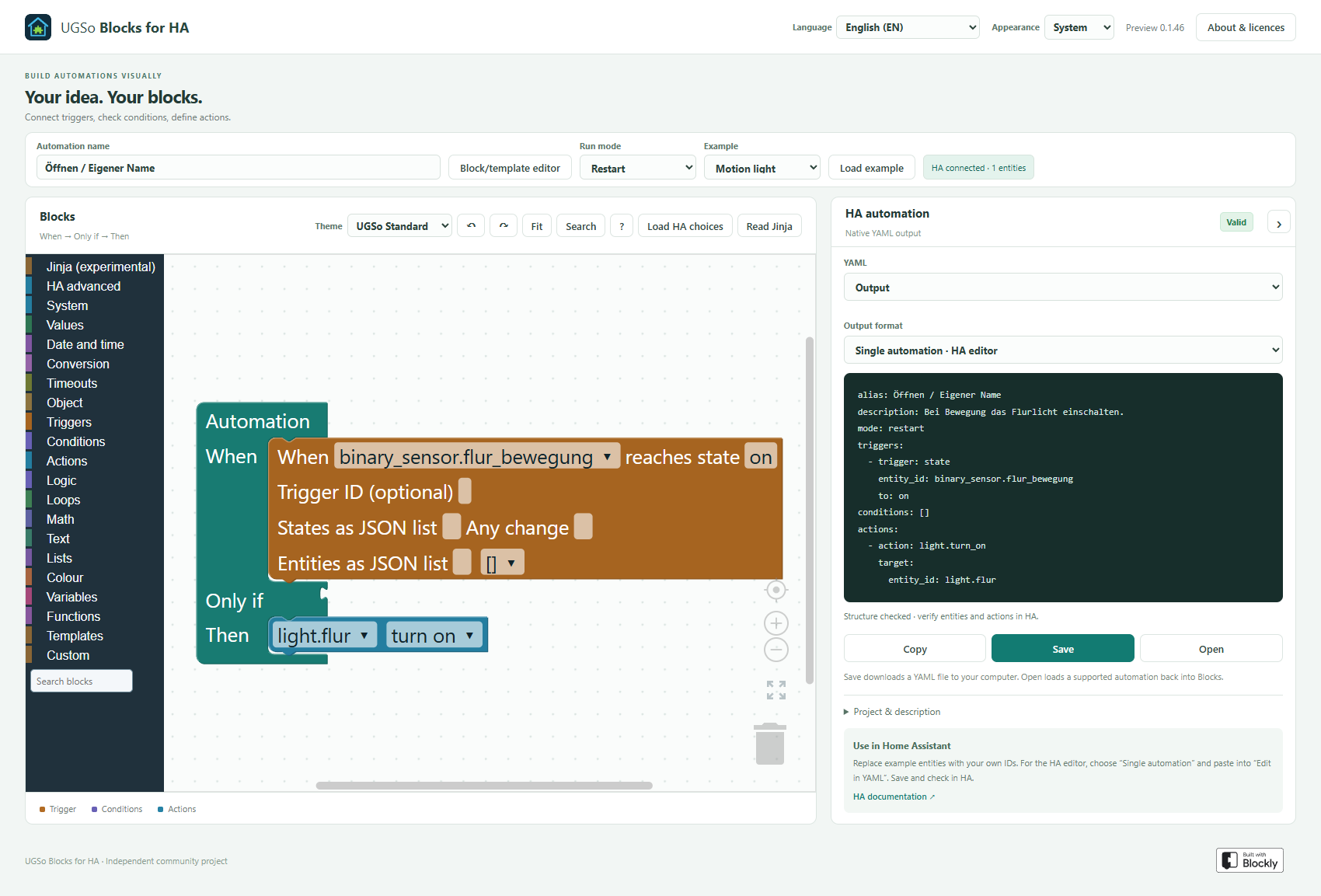
Name, description, ID and single, restart, queued, parallel modes are available. Queued/parallel support a maximum count. Three examples cover light, battery and evening light.
System blocks added in version 0.1.6
The System category contains three new action blocks. Values also includes a green Text block with a String output for the log message input. Numbers and conditions cannot connect to this input.
| ioBroker | Our block | Controls and HA behavior |
|---|---|---|
| Debug output | Log | Editable text shadow or text block; Info, Warning, Error, Debug or Critical dropdown. Generates system_log.write. |
| Control script | HA script | Enter script ID; choose start without waiting, stop, or call and wait. |
| Update state | Refresh entity | Requests a refresh through homeassistant.update_entity. Does not set state and has no ioBroker ack semantics. |
| Text | Text value block | Editable log message, retained in projects and YAML. |
Start without waiting generates script.turn_on and lets the automation continue. Stop generates script.turn_off. Call and wait generates a direct script.name call: the automation waits for completion and errors can propagate to the caller. Script parameters still use the generic HA action.
YAML import recognizes exact supported System action shapes. Additional data such as a custom logger or script variables remains in the generic HA action. Refresh behavior depends on integration support. Log messages are written when HA executes the automation; Info and Debug may be filtered by HA logging configuration.
References: HA system log, HA scripts, HA Core actions.
Gear icon: extend branches
As in the familiar ioBroker editor, the gear opens a small workspace. Attach else if clauses to the if container and optionally add else. Then connect conditions and actions in the main block.
- One branch generates
if/then, optionallyelse. - Multiple branches generate
choose; else becomesdefault. - HA runs the first matching branch, skipping any other matching branches.
- Removed clauses detach connected blocks. Reconnect or remove them before exporting.
- YAML import and JSON projects preserve branches. Older projects retain existing else actions.
AND/OR/NOT has its own gear for 1–100 condition value inputs. Triggers and actions support chains. Sun, comparison and switching choices use dropdowns. Generic HA action data currently uses JSON; a visual data-field mutator is planned.
Connections and controls
The category menu is dark and the block flyout is light. Values are green, triggers orange, conditions purple and actions blue. Category markers identify each block group; the selected category has an additional highlight.
- Left output / right value input: Conditions produce Boolean values for the automation condition slot, if/else-if and AND/OR/NOT. Numbers produce Number values for thresholds and delays. Type checks reject incompatible connections.
- Previous / next: Triggers and actions each form their own statement chains and cannot be mixed.
- Statement cavity: Then/else slots accept action sequences. Conditions belong in value inputs.
- Shadow numbers: Thresholds and delays have editable defaults that can be replaced by number blocks. Removing a replacement restores the default. Log messages use String text blocks with editable shadows. Sensor and entity value blocks are not implemented yet.
- Context menu: Right-click or long-press for Blockly actions such as duplicate, comment, collapse, disable, delete and help. Help links to the documentation. Comments remain in JSON projects; YAML comment export is not implemented.
- Disable: Disabled actions, triggers and conditions are omitted from export. Required content remains required: missing triggers, empty if conditions or empty action branches prevent export.
- Trash: Delete blocks, open the trash and drag deleted blocks back to the workspace. History lasts for the current session. Undo/redo is also available.
- Insertion marker: Blockly previews the potential connection while dragging.
Projects from version 0.1.4 and earlier are upgraded automatically. Old condition chains become AND groups preserving their YAML meaning. Existing supported YAML files remain importable.
Blockly library and tracked development status
We already use the original Blockly 13.3.0 library rather than building a separate block engine. Blockly provides the workspace, category toolbox and flyouts, typed connections, shadow blocks, mutators, context menu, zoom, trash and insertion markers. HA block definitions, structural validation, project migration and the YAML generator are UGSo code. No ioBroker JavaScript is executed.
The original workspace and block-parts documentation and Blockly examples guide familiar interaction patterns. Library updates require connection, import/export and browser checks.
| Task | Status in 0.1.16 / next step |
|---|---|
| Connection geometry and type checks | Boolean conditions and Number values use side connections; triggers/actions use separate statement chains |
| Extensible blocks | If, AND/OR/NOT, cases, objects and lists implemented; visual action-data fields planned |
| Default values | Shadow numbers and text blocks implemented; entity value blocks pending |
| Sensor values and attributes | Dedicated blocks pending; already usable through templates. Conversion blocks now provide type conversion |
| Editor controls | Context menu, help, disable, trash recovery, zoom and insertion markers available |
| Comments | Retained in projects; YAML comments and dedicated comment block pending |
| Menu and block colors | Dark category menu, light flyout and distinct group colors implemented |
| ioBroker categories | System, date/time, conversion, timeouts, objects and logic reviewed; HA execution differences documented |
| JSONata | Planned; evaluate native object/list access and an optional HA runtime adapter |
| Publishing and updates | Every new HA app starts in the shared repository with installable packaging; bump package and UI versions together |
| HA connection, catalog and plugins | Read-only entity integration and declarative block packages available; live action selection and package updates pending |
This page tracks implemented features and outstanding tasks together and is maintained with each extension.
Custom blocks: implemented and roadmap
Since 0.1.18 the HA form editor, Blockly preview, value/condition/action/trigger blocks, typed fields and value inputs, package import/export and embedded project definitions are available. Usage and limits.
Embedding the original Blockly Developer Tools, dropdowns, images, variable fields, statement containers, mutators, dynamic inputs, package updates and uninstall remain planned.
System: status and next steps
Control, toggle, delay, generic actions, logging, script control, entity refresh and helper control are available. Entity selection is available since 0.1.17. Dedicated comment, state/attribute value, existence/availability and number/text helper blocks will follow progressively. ioBroker ack, adapter instances and datapoint creation have no direct HA counterpart.
The full comparison and implementation status is updated with every feature. Declarative block packages and a sample catalog are available since 0.1.18.
Validation and origin
The editor validates supported structure. Entity IDs are searched or entered manually; installed actions and execution in real HA are not verified. Replace example entities and check actions in HA before use. The editor does not write HA system files.
Built with Blockly. Original HA blocks, not an ioBroker fork. Our code and Blockly: Apache-2.0; YAML library: ISC. License texts are included.
Built with Blockly
Blockly is an open-source developer library from the Raspberry Pi Foundation, originally developed at Google. The app uses the unmodified official attribution badge since 0.1.19, at 32px height with surrounding space and a link to Blockly. Both SVG variants are bundled locally. Original attribution guidance.


Home Assistant sidebar
Since 0.1.20, the sidebar entry uses the monochrome building-block icon mdi:toy-brick-outline. Update and restart the app, enable Show in sidebar, and reload Home Assistant if the previous icon persists. Native app configuration uses MDI icons; the colourful UGSo icon remains in the app store and editor. HA configuration · Original icon.
Workspace search and keyboard navigation
Since 0.1.21, Suchen in the workspace toolbar finds blocks already placed on the canvas, including HA and custom blocks. The search at the bottom of the toolbox still finds available blocks to add. Search changes the view, not YAML or the saved project.
With focus in the workspace, Ctrl/Cmd+F opens search. Enter selects the next match, Shift+Enter the previous match, and Escape closes search and focuses the current block. Search buttons have German accessible labels, matching the editor UI.
The ? button opens keyboard help. Blockly 13.3 provides navigation: Tab enters the workspace; arrow keys move through blocks and fields, Enter edits fields, T focuses the toolbox, and M picks up a block. Extra navigation shortcuts are enabled: Home/End within a block, Page Up/Down within a stack, Ctrl/Cmd+Home/End between first and last blocks, and Ctrl/Cmd+arrows to scroll. Text inputs and dialogs retain their normal editing behavior. Screen-reader behavior has not been independently verified.
Original sources: workspace-search plugin, Blockly keyboard navigation.
Since 0.1.23, the introduction and automation settings use less vertical space: smaller heading and spacing, with 32-pixel project controls. This leaves more room for the workspace. The HA connection status and entity count are now displayed in the settings bar, including on narrow screens.
Since 0.1.24, the arrow at the upper right of the HA output panel collapses it to the right. Blockly expands into the free space. The narrow HA-Ausgabe rail reopens the panel, with the state saved locally. On mobile, a compact row remains below the editor. Collapsing changes neither YAML nor projects.
Since 0.1.28: States as JSON list, e.g. ["1_single","1_double"]; optional trigger IDs on every standard trigger; Triggered by ID as a native trigger condition (single ID or JSON list). Generic HA actions support Targets as JSON list, optional metadata and explicitly preserved empty data objects. Four-button automations with four choose branches can be fully imported.
Single automation · HA editor output omits the top-level id. Trigger IDs remain. Projects and automations.yaml list output retain an existing automation ID.
Home Assistant: Trigger IDs · Trigger condition
Since 0.1.29, the Blockly workspace fills the editor panel down to the legend. A taller YAML panel also expands the workspace; output remains collapsible.
Since 0.1.30: enable Times as JSON list for several fixed times, e.g. ["10:00:00","13:00:00","19:00:00"]. Any change omits to; Entities as JSON list watches multiple entities. Without to, HA also reacts to attribute changes. Event triggers support e.g. timer.finished with an optional JSON data filter. Native time conditions preserve before/after: fixed times, after inclusive and before exclusive, including overnight windows. Equal bounds mean all day. Time helpers, time templates and weekday filters remain outside the supported import. The full pool-pump automation retains multiline timer templates and nested choose branches.
Home Assistant: triggers · Time condition
Since 0.1.31, the new block supports native temperature.changed. Target (JSON): entity_id string or list. Threshold (JSON): type any, above, below, between or outside. any requires only type; above/below require value, between/outside value_min and value_max. Numbers: number plus unit_of_measurement (°C/°F). References: entity (sensor, number or input_number). Optional trigger ID. Other targets (area/device/label) remain unsupported. MQTT topics, qos/retain/evaluate_payload and multiline JSON/Jinja payloads are preserved.
Home Assistant: temperature.changed
0.1.32: Calendars and response variables. →
0.1.33: Numeric triggers with hold duration. →
0.1.34: Multiple variables in one action. →
0.1.35: Delay as duration text or template. →
0.1.36: Dynamic HA action names. →
0.1.37: Time pattern trigger.
0.1.38: Dynamic target entities.