
Extended HA automations and Jinja
Since 0.1.43, extended HA blocks offer labelled inputs instead of one large JSON object. There are still 163 block types; HA extended and Jinja (experimental) complement simple blocks. Import checks the supported structure; verify integrations, device IDs, templates and execution in Home Assistant.
All 15 classic extended triggers, general conditions and steps, integration targets/options, calendars, temperature thresholds, time patterns, variables and wait/step options use structured fields. numeric_state, for example, provides entity, above, below, attribute, template, duration and ID. Empty optional fields are omitted; both bounds can be edited independently. Entity fields support HA search, manual IDs, JSON lists and templates. When changing the type of a general block, add any further fields through its options if needed.
Enter lists and objects as JSON; null is an explicit null, "null" is text. States and payloads remain text. Unchanged values retain their original types and exact Jinja source. Additional options (JSON) retains extra properties. Complex data and nested branches remain separate JSON fields; they are not automatically decomposed into connected branches. Older JSON projects automatically load the new fields; YAML import/export and saved projects remain compatible.
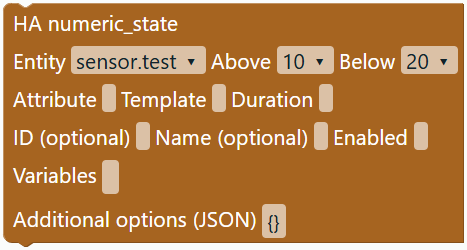
Original specification: HA triggers, HA conditions, HA steps.
Triggers and conditions
| Area | Supported additions |
|---|---|
| State | Multiple entities; from, to, not_from, not_to, lists and null; attributes and for. |
| Numbers | Both bounds, helper entities as bounds, attributes, value_template, duration and multiple entities. |
| Time | Times and lists, time helpers/sensors, time source with offset, weekdays and time patterns. |
| Sun and HA | Sunrise/sunset with offset; startup and shutdown. |
| More triggers | MQTT, template, webhook, zone, device, tag, conversation, geolocation, event and classic calendar. |
| Integrations | calendar.event_started/ended, temperature.changed, power.changed, motion.detected, timer.finished. Device, area, floor and label targets are also supported. |
| Conditions | Time/weekday, state with lists/attribute/duration/match, numeric bounds, sun, zone, device, trigger ID, template and nested AND/OR/NOT. Template shorthand is preserved. |
The integration block provides a dropdown for power, motion and timers. Enter targets and options separately. Changing the integration replaces unchanged example values; custom values remain. Extended JSON triggers support alias, enabled, id and trigger variables. Unknown types and unsupported fields are rejected with a message.
Targets, variables and options
HA action with target type offers entity_id, device_id, area_id, floor_id and label_id. Enter an ID, JSON list or HA template. Use HA step (extended) for multiple target types together. Action data may be an object or a complete HA template; import preserves either form.
Variables also support lists and nested objects. Existing variables have individual value fields; add new names through additional options. Common step options alias, enabled, continue_on_error, response variables and metadata have separate inputs. enabled accepts a Boolean or HA template; continue_on_error accepts a Boolean.
Under Project & description → HA options, edit variables, trigger_variables, initial_state, trace.stored_traces and max_exceeded. Apply accepts valid options only. Omitted options are removed; {} removes every option managed by this field. Name and execution mode remain separate. An automation without alias can be imported; its filename falls back to automation.yaml. All app controls follow the selected language since 0.1.46.
Waiting and action groups
- Wait for trigger connects a trigger chain and offers
timeout/continue_on_timeoutin its options field. - Action group generates a native
sequencewith connectable steps. - Parallel starts native parallel branches. + / − allows 1–100 branches. Removing an occupied branch leaves its contents disconnected; reconnect or delete them.
- Continue only if generates a condition as an action step. Event, Assist response and scene have dedicated blocks.
- Repeats also support literal lists/objects for
for_each; delays accept combined units and fractions. Extended or mixed branch shapes remain JSON steps.
These blocks export native HA flows. Execution takes place in HA; there is no local script engine.
Jinja (experimental)
Since 0.1.41, Jinja einlesen can decompose templates into editable nested blocks. Paste the template, check the preview, leave Decompose into editable blocks selected and optionally choose Als Bedingung. Block erstellen places the connected structure beside the automation. Connect the outer value block to a variable assignment or value input; connect the condition block to a Boolean input. Disabling decomposition creates an original-text block.
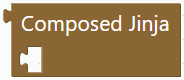
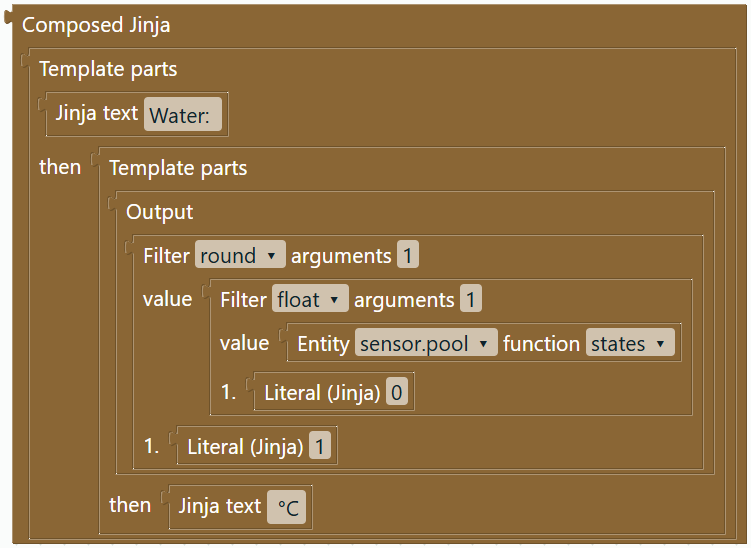
Example: Water: {{ states('sensor.water') | float(0) | round(1) }} °C becomes text parts and an output containing an entity function, float and round blocks. The entity field opens the existing search. Edit entities, filters, arguments and rounding precision separately. YAML import decomposes matching template values, for example in a single variable assignment, and template conditions. More specific existing shapes are retained. Templates inside action-data/options JSON remain in the JSON field.
| Supported parts | Representation |
|---|---|
states, state_attr, is_state, is_state_attr with a fixed entity ID | Entity function with search field and argument sockets |
now(), simple variable names, numbers, quoted strings, Boolean and none | Expression blocks; Jinja variable names are text fields |
float, int, round, default, abs, lower, upper, trim, length, string, list, join, replace | Nested filters with 0–3 positional arguments |
+, -, *, /, //, %, ~, comparisons, and, or, not | Calculations/comparisons with explicit parentheses |
value if condition else other_value | Conditional value selection |
Text, {{ ... }}, simple {% if ... %}...{% else %}...{% endif %} | Text, output, join and if/else blocks |
{% for item in items %}...{% else %}...{% endfor %} | Simple loop over an expression, optional empty case and nested parts |
Preserving originals: Unchanged structures retain exact original text, including whitespace, after project reload and undo/redo. Editing generates newly formatted Jinja; restoring fields to the same structure restores the original. Blockly projects save the structure and original. YAML saves the template text, which is analysed again on import.
Decomposition limits
This is an original parser for a limited Jinja subset. If any part is unsupported, the entire template remains an editable original block. Examples include set, namespace, object/list access, list/object literals, tests such as is defined, chained comparisons, elif, named arguments, unknown functions/filters, comments and whitespace-control markers. No partial decomposition, syntax guarantee or local execution. Outer value blocks accept complete templates; only a single Jinja output can be embedded in another calculation. Missing inputs or invalid literals prevent export. Limits: 10000 characters, 100 template parts and bounded nesting. Jinja variable names are not automatically renamed with other Blockly variables. Home Assistant evaluates the template; test there.
Blockly projects also retain shapes and positions. YAML → Blockly → export preserves supported values, including omitted optional fields. Limits: 100 chain entries/branches, 10 flow/condition nesting levels and bounded data/template sizes. Integration-specific device options are not exhaustive; rejected fields are never silently removed.
Original sources and licenses
Original UGSo implementation based on public specifications, without copying ioBroker’s execution engine. Blockly/plugin licenses appear under Über & Lizenzen; the app uses Apache-2.0.