
Select entities
Since 0.1.44, matching action and target fields in simple and extended blocks open a searchable picker. A small arrow marks these fields. HA-Auswahl laden in the toolbar and Neu laden in the dialog refresh the read-only catalogues.
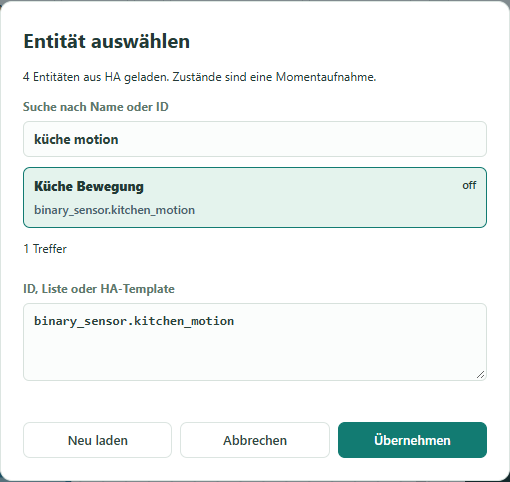
The image uses simulated test entities and the German interface. Since 0.1.46, the interface follows the selected DE/EN/FR app language. Entity names retain their original HA installation language.
Usage
- Click the entity ID inside a block.
- Search by name or ID. All search words must match. The first 150 matches are displayed; narrow the search for larger lists.
- Choose a result and press Übernehmen (Apply). Only applying changes the block. Abbrechen (Cancel) or Escape preserves the previous value.
- Alternatively enter an ID such as
light.living_roommanually. This also works offline or for entities missing from the list.
Results show the name, ID and current state with unit. States are a snapshot, not continuous monitoring or sensor-value blocks for an automation.
| Block | Selection |
|---|---|
| State/numeric triggers and conditions | All loaded entities |
| Light with colour/brightness | light only |
| HA script | script only |
| Helper | Current helper type: input_boolean, counter or timer |
| On/off/toggle, refresh entity, generic HA action | All loaded entities; still check action support in HA |
Action fields show actions reported by HA. Entity targets use domains from action metadata or the action name. Target selection follows entity_id, device_id, area_id, floor_id or label_id: entities, devices, areas, floors or labels. The last four catalogues are not filtered by action. Mehrere Ziele auswählen enables lists in supported fields. Manual IDs, JSON lists and supported Jinja templates remain available; multiline Jinja text is preserved in full. Changing target type does not rewrite existing IDs.
Scenes and helpers use matching entity domains; extended numeric thresholds offer sensors and numeric helpers, time fields offer time helpers and sensors. Manual numbers/clocks remain possible. Existing operation dropdowns remain available. Variable names, trigger IDs, attributes, free text and complex data do not receive generic HA selection. Changing an ID does not rewrite references within Jinja or JSON data. Without an action catalogue, common examples are explicitly identified as examples; unavailable target catalogues permit manual IDs.
HA app and data
Refresh the repository in the HA app store, install 0.1.44 and restart the app. The app requires homeassistant_api: true and uses the server-side SUPERVISOR_TOKEN. Entities and actions are read through the REST API, target registries through the WebSocket API. Missing registry permissions affect the respective list. No token entry is required in the editor.
The browser receives selection metadata only: IDs, names, domains and entity state/unit. Other attributes and credentials are not forwarded. The endpoints read catalogues only and execute no HA actions. The server does not follow redirects carrying credentials.
The list comes from HA states, not the complete entity registry. Disabled or not-yet-available entities without a state may be absent. unknown/unavailable states are displayed when present. A refresh failure clears the previous list; existing block IDs remain intact.
JSON projects and YAML contain the selected field values. Catalogues, names, state previews and credentials are not persisted or exported. All 163 block types remain available. Download your browser project through Projekt sichern before updating; a source backup does not include browser sessions.
Local development
Install the Python dependency once with python -m pip install --require-hashes -r requirements.txt. Docker installs it automatically.
npm run dev alone uses manual IDs. For a connection, additionally start Python 3 with npm run entities. Set BLOCKS_HA_URL (base address without /api, for example http://homeassistant.local:8123) and BLOCKS_HA_TOKEN only in the server environment. Vite at 127.0.0.1:4180 proxies requests to the bridge at 127.0.0.1:9001. Never put credentials in source or project files.
Docker starts the bridge and frontend together. Outside HA, bind locally or use an authenticated frontend when credentials are configured; standalone user authentication is not included yet. HA ingress protects access inside HA.
Verification
Project/YAML compatibility, search, filters, cancel, manual entry, failure handling, mobile layout and the complete Docker chain were verified against a simulated HA server. A practical test in a real HA installation remains pending. Entity selection does not confirm that a particular device supports an action.