
 Logic Studio
0.1.12 – public test update, 8 November 2026. Both interface and documentation now support DE/EN/FR. Logic Studio is a standalone HA app for visual function-block plans, independent of Grafik Visual Studio and Blocks for HA. The React Flow canvas retains custom blocks, typed connections, zoom and MiniMap; libraries and licenses are bundled locally.
Test release
Install on a test system first and create a full backup beforehand. Native detail properties currently use JSON. The app does not write automations/scripts back to HA or control devices. Review and install generated output yourself.
GitHub test release and ZIP · Source in the shared repository
HA Logic Studio Pro
HA Logic Studio Pro is a standalone Home Assistant app in the shared UGSo repository. It builds on Logic Studio and draws on experience with ioBroker.
Available features
- Function block diagram: Connect blocks, display signals at the inputs, and simulate the diagram. Execution on the HA server can respond to changes or run on a fixed cycle.
- Rules and Blocks A: Build automations visually and export them as HA YAML.
- Blocks JS, JavaScript, and TypeScript: Edit logic, test it with simulated values, and run it on the HA server.
- HA YAML: Edit, validate, and export automations and scripts.
- Project management: Store projects and folders on the server for each HA user.
- Language selection: The editors are available in German, English, and French.
HA Logic Studio Pro 0.1.81–0.1.100
0.1.89 · JSON import in HA YAML
Use Import JSON to select a file or paste its contents. The validated configuration opens as a YAML draft. Choose Save to keep it.
On the PC test system (64), both Flur.automation.json from Logic Studio Pro and flur test.flode.json from FLODE were imported using the file picker. Both produced equivalent YAML and preserved all three choose branches for toggle, turn on and turn off.
HA Logic Studio Pro 0.1.89 · GitHub / ZIP
0.1.88 · Visual HA YAML preview
The Choose card is centred between its branches and always shows the labelled ports. On the PC test system (64), the hallway automation showed Option 1, Option 2, Option 3 and Default. All seven connections were visible, the cards did not overlap, and the YAML text remained unchanged when switching views.
HA Logic Studio Pro 0.1.88 · GitHub / ZIP
0.1.87 · React Flow
The graphical HA YAML preview uses React Flow with a fine dot grid, compact cards, a minimap, zoom, panning and Fit view. Each choose card has a labelled output for every option and a default output. The graph is a read-only view. Make changes in the YAML editor.
All three outputs of the hallway automation were verified on the PC test system (64). Cards stayed separate with long entity IDs, and the YAML text matched the input after switching back to the editor.
HA Logic Studio Pro 0.1.87 · GitHub / ZIP
0.1.86 · Visual HA YAML preview
The visual preview displays triggers, conditions, and actions as cards. For a choose action, it shows each branch with its conditions and actions.
On the PC test system (64-bit), the hallway automation showed all four triggers and all three choose branches. The two downloaded YAML files were byte-identical. Comparing them with the input confirmed that all fields were preserved, including trigger IDs, the device ID and event options, target entities, sun offsets, and mode: restart. PC test system (64-bit)
HA Logic Studio Pro 0.1.86 · GitHub / ZIP
0.1.85 · Time windows and weekdays in Rules
Time window and weekdays lets you combine a start time, an end time, and selected weekdays. You can also select weekdays alone. The export uses Home Assistant’s native condition: time.
In the live test, the automation ran only when both the time and the weekday matched. The test helpers stayed off outside the time window and on a nonmatching weekday. PC test system (64-bit)
HA Logic Studio Pro 0.1.85 · GitHub / ZIP
0.1.84 · Home Assistant startup trigger in Rules
The Rules palette and wizard offer Home Assistant started. The YAML export uses trigger: homeassistant with event: start.
In the live test, the automation turned on the test helper after Home Assistant Core restarted. PC test system (64-bit)
HA Logic Studio Pro 0.1.84 · GitHub / ZIP
0.1.83 · MQTT triggers in Rules
The Rules wizard offers MQTT message with a required topic and an optional payload filter. With no filter, any message on the topic triggers the automation.
In the live test, the automation ran exactly once when both the topic and payload matched. A wrong topic and a different payload produced no runs. The Home Assistant trace confirmed the counter action. PC test system (64-bit)
HA Logic Studio Pro 0.1.83 · GitHub / ZIP
0.1.82
The Rules wizard offers a Time from helper trigger. Select a Home Assistant input_datetime helper that includes a time. The YAML export uses trigger: time and sets at to the entity ID. Home Assistant picks up changes made to the helper’s time.
In the live test on the PC test system (64-bit), the helper time was changed from 17:27:27 to 17:27:56. The original time passed without a run. The Home Assistant trace confirms the automation ran at 17:27:56. PC test system (64-bit)
HA Logic Studio Pro 0.1.82 · GitHub / ZIP
0.1.81
The Rules wizard offers sunrise and sunset triggers. Enter the optional offset in minutes. Negative values trigger before the solar event and positive values trigger after it.
The YAML export was checked and validated in the installed version on the PC test system (64-bit). For 30 minutes before sunrise, it generated event: sunrise and offset: -1800. For 15 minutes after sunset, it generated event: sunset and offset: 900. The YAML offsets are in seconds.
HA Logic Studio Pro 0.1.81 · GitHub / ZIP
HA Logic Studio Pro 0.1.61–0.1.80
Release history
0.1.80
The Rules wizard offers a Numeric threshold trigger with an above limit, a below limit, or both limits for a range. The attribute and minimum duration are optional. The YAML export uses Home Assistant’s native numeric_state trigger.
On the PC test system (64-bit), the installed Rules editor generated above: 50 for a threshold of 50. In the live test of the exported YAML, the automation fired once at 51. The counter stayed at 1 at both 65 and 49. It reached 2 when the value crossed the threshold again at 52.
HA Logic Studio Pro 0.1.80 · GitHub / ZIP
0.1.79
The Blocks JS import preview shows which Home Assistant entity each block needs or which code change is still required. Fixed ioBroker IDs can be mapped to HA entities directly in the preview.
Using the original test33.xml export on the PC test system (64-bit), the state trigger was mapped to a sensor and the write block to a number helper. The test run simulated writes of 21 and 20.
HA Logic Studio Pro 0.1.79 · GitHub / ZIP
0.1.78
In Global scripts, JavaScript and TypeScript projects can select saved scripts from the folder of the same name. The dialog shows how to call named functions exposed with export function, such as shared.script_43.twice(21).
On the PC (64) test system, one general JavaScript project and one general TypeScript project called the same global TypeScript function. Both returned 42 in the test run and in the runtime. TypeScript highlighted an argument with the wrong type on line 2. The selection persisted after reloading.
HA Logic Studio Pro 0.1.78 · GitHub / ZIP
0.1.77
Check types checks the TypeScript source and the script API types. The editor highlights lines with errors. Clicking a line number in the log jumps to the original source. Test runs and the runtime check types before executing the script.
On the PC (64) test system, two deliberate type errors were highlighted on lines 2 and 3. After correction, the test run succeeded. Starting the faulty script in the runtime reported line 2.
HA Logic Studio Pro 0.1.77 · GitHub / ZIP
0.1.76
In the JavaScript and TypeScript editors, typing ha. suggests script API methods. The list shows parameters and return types. The editor highlights the current parameter while you enter a call.
The Chrome test on the PC (64) test system verified keyboard selection in both editors and the signatures for ha.readState, ha.callAction and ha.pause.
HA Logic Studio Pro 0.1.76 · GitHub / ZIP
0.1.75
When a test run or runtime error can be traced to the source, the log shows the original JavaScript or TypeScript line. Clicking the line number jumps to it in the editor.
On the PC (64) test system, both execution modes reported the deliberate errors at JavaScript line 3 and TypeScript line 5. The TypeScript line number was correct even though transpilation removed a type declaration.
HA Logic Studio Pro 0.1.75 · GitHub / ZIP
0.1.74
Logic Studio Pro keeps the last 100 runtime log entries per user and project. On the PC (64) test system, an entry remained available with the same timestamp after an app restart. The script was stopped, and the entry did not appear in another project.
HA Logic Studio Pro 0.1.74 · GitHub / ZIP
0.1.73
In the runtime test on the PC (64) test system with 0.1.72, the second trigger started before the first had finished. Both completed. A deliberate error stopped the affected script. The other script then successfully handled a third trigger.
After the local update to 0.1.73 on the PC (64) test system, the Home Assistant app page no longer displayed “Experimental”, and the Studio header no longer displayed “Internal test”. The three test projects were deleted.
HA Logic Studio Pro 0.1.73 · GitHub / ZIP
0.1.72
Blocks JS imports ioBroker script messages with replies and computed target addresses. The preview identifies the receiver address and reply handling to review for each affected block.
On the PC (64) test system, one running Blocks JS script built the target address from two pieces of text. The second script logged receipt, and the sender executed its reply block. Both test projects were then deleted and the temporary permission for logic_studio_script_message was removed.
HA Logic Studio Pro 0.1.72 · GitHub / ZIP
0.1.71
The Expert mode toggle in the project menu saves the preference for each Home Assistant user. It reveals advanced tools, including source and scripting API in JavaScript, import and code output in Blocks JS, and diagnostics and execution settings in function block diagrams. Save, Cancel, Test run and Play remain directly accessible in the editors that support them.
After a full backup on the PC (64) test system, the three editors were checked. The preference persisted after reloading. The original setting was then restored and confirmed after another reload.
HA Logic Studio Pro 0.1.71 · GitHub / ZIP
0.1.70
Use the pencil icon in the project tree to rename a custom folder. After a full backup on the PC (64) test system, the project tree exports before renaming and after reloading showed the same folder ID, project assignments and order for both projects. The original folder name was restored and verified after another reload.
HA Logic Studio Pro 0.1.70 · GitHub / ZIP
0.1.69
The Rules wizard follows language changes in the open editor. After a full backup on the PC (64) test system, the Chrome tablet viewport (820 × 1180 px) test verified that the title, steps and triggers followed DE → EN → FR → DE. Both the Studio interface and the Home Assistant app manager displayed 0.1.69. The server now reads the displayed version from the package metadata.
HA Logic Studio Pro 0.1.69 · GitHub / ZIP
0.1.68
The YAML export downloads the file directly from the editor. Two exports on the PC (64) test system produced two complete, byte-identical YAML files. Chrome flagged the second export as an insecure download. After the tester selected Keep, the second file was also complete in the Downloads folder.
HA Logic Studio Pro 0.1.68 · GitHub / ZIP
0.1.67
Current public test release. Create a full backup and try the update on a test system first.
The imported “State exists?” and “Object ID” blocks retain their ioBroker IDs. Explicitly map each ID to a Home Assistant entity in its block. Blocks JS also finds embedded Blockly data in JavaScript files when other comments follow it.
The import preview’s Required code changes section explains how to replace unsupported blocks such as exec. After a full backup on the PC (64) test system, XML and JavaScript test files were imported and the new mapping fields were checked in the editor.
Reconnection after a Core restart
A full backup was created on the PC (64) test system before the test. After Home Assistant Core restarted, the runtime reconnected 31 seconds after the connection dropped. The same JavaScript run then received the test helper’s change from off to on and the custom HA event logic_studio_runtime_test with its test payload.
Folder and script order after reloading
After a full backup on the PC (64) test system, two test scripts were moved to a different folder by drag and drop. After saving the order and reloading Logic Studio Pro, both scripts were still in the destination folder in the saved order.
HA Logic Studio Pro 0.1.67 · GitHub / ZIP
0.1.66
Enable Save counters and latches in the function block diagram and save the project. CTU, CTD, CTUD, RS and SR can restore their values after an app restart.
The Blocks JS import report lists calculated ioBroker IDs separately. Use the imported block’s ID mapping (JSON) field to map each possible ioBroker ID to a Home Assistant entity.
On the PC (64) test system, the CTU counter and RS latch retained 1 and true after an app restart.
In the live test on the PC (64) test system, the imported Blocks JS script calculated the ioBroker ID zigbee.0.sensor. It used ID mapping (JSON) to read the Home Assistant test helper input_boolean.logic_studio_runtime_test. Two runs started with Play logged false with the helper off and true with it on.
HA Logic Studio Pro 0.1.66 · GitHub / ZIP
0.1.65
Autostart, simulation and ioBroker import
JavaScript, TypeScript and function block diagrams can run when the app starts. Enable Run when the app starts and save the project. The simulation supports breakpoints and single stepping. Automatic layout preserves pinned blocks. The Blocks JS ioBroker import preview lists unsupported blocks and fixed IDs to map.
On the PC (64) test system, the saved JavaScript test project started automatically after an app restart. A simulation breakpoint and single step were also checked, as was the ioBroker import preview with a fixed ID.
HA Logic Studio Pro 0.1.65 · GitHub / ZIP
Expanded Rules and live test on the PC (64) test system
State triggers support from and to values, an attribute and a minimum duration. Conditions check states, attributes and numeric limits. THEN and ELSE support a Home Assistant action picker with JSON parameters and separate delay steps.
The editor and action picker were tested locally in the browser. After a full backup, the generated YAML ran directly in Home Assistant on the PC (64) test system. A brief pulse did not trigger a run. Holding the state for three seconds ran THEN. A change to the display name ran ELSE. Both traces confirmed a two-second delay and the expected text value. The test automation and both helpers were removed.
The new blocks export as HA YAML. Rules → JS reports when a block prevents conversion.
HA Logic Studio Pro 0.1.62 · GitHub / ZIP
YAML export and live test on the PC (64) test system
The Rules exporter preserves states such as on and off as strings instead of YAML booleans. The corrected automation ran directly in Home Assistant on the PC (64) test system using test helpers.
| Trigger | Condition | Home Assistant trace result |
|---|---|---|
| State change | OR matched | Both THEN actions |
| State change | AND did not match | Both ELSE actions |
| HA event | NOT matched | Both THEN actions |
| Time 20:26 | NOT did not match | Both ELSE actions |
A full backup was taken before testing. The test automation and all three helpers were removed afterwards.
HA Logic Studio Pro 0.1.41–0.1.60
Release history
Rules: compact palette and multiple triggers
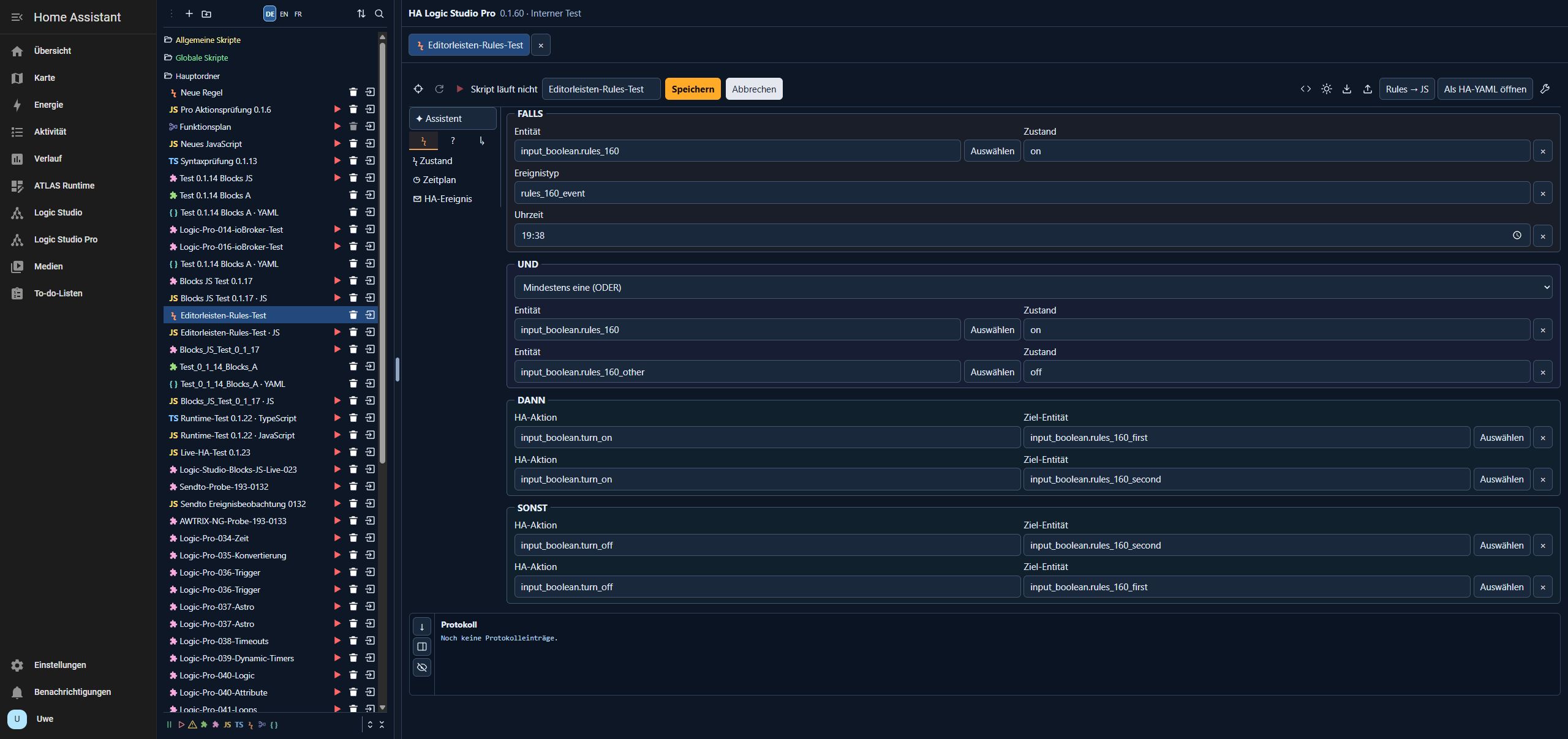
The editor has a compact icon list on the left. A rule can combine state changes, a daily time and Home Assistant events. Conditions support AND, OR and NOT. Both THEN and ELSE run multiple actions in the order shown.
On the PC (64) test system, an existing rule was tested with three triggers, two conditions and two actions per branch. The YAML preview showed the expected structure. In the Studio test run, all three simulated triggers ran both THEN actions when the OR condition was met. When the AND condition was not met, both ELSE actions ran in the configured order. No real devices were operated.
HA Logic Studio Pro 0.1.60 · GitHub / ZIP
Create rules with the wizard
Select Rules → Wizard. It takes you through Trigger → Conditions → Actions → Review. A rule can react to a state change, a daily time in the HA time zone, or a Home Assistant event. Conditions and the ELSE branch are optional. Review shows the YAML preview. Apply transfers the draft to the editor; Save persists it. Existing rules can still be edited and opened as JavaScript or HA YAML.
HA Logic Studio Pro 0.1.59 · GitHub / ZIP
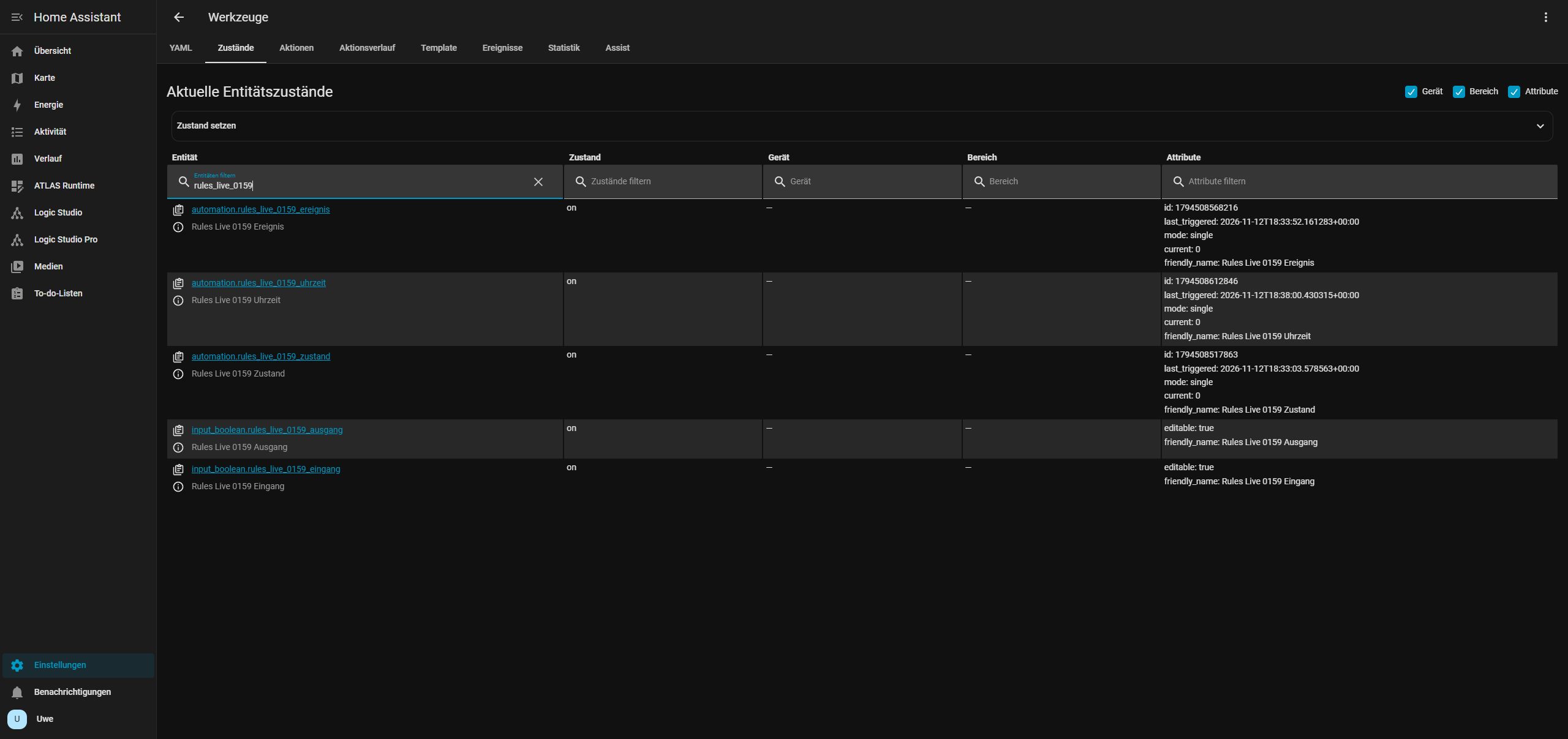
On 12 November 2026, all three triggers were tested directly in Home Assistant on the PC (64) test system. A state change from off to on, the daily trigger at 19:38 (HA local time), and the rules_live_0159_event event each switched the test output on. A full backup was created before testing. The three test automations and both test helpers were removed afterward.
Changes since 0.1.12
- Project tree and editors: Projects and folders are stored on the server per HA user. Existing browser projects can be migrated on first launch from the original browser. JavaScript and TypeScript have syntax highlighting, line numbers and their own toolbars. The project picker, tree and filters use matching icons and colors. Blocks A and Blocks JS have separate filters. The automatic project pane width can still be adjusted with the handle.
- Blocks A and Blocks JS: Blocks A uses the bundled Blocks for HA catalog. Blocks JS has its own JavaScript palette. Blocks A exports HA automations as YAML. Blocks JS generates JavaScript for the test run and runtime. Unrecognized ioBroker blocks are retained as placeholders and prevent code generation until replaced. Map ioBroker object IDs to Home Assistant entity IDs.
- Function block diagram: Simulation, one-second step and reset have icons in the top toolbar. Output format and preview sit on the right. Connections can be moved to another target input, and signal values appear at the input.
- Server runtime: Play starts JavaScript, transpiled TypeScript or Blocks JS on the HA server. Stop and restart are available in the editor. Runtime status and logs remain available across browsers. The separate test run uses simulated states and events. HA YAML scripts and automations can be exported and run in Home Assistant after import.
Configure the live runtime
Under Settings → Apps → HA Logic Studio Pro → Configuration, add the required entries, save and restart the app. The lists start empty. Example for a dedicated test helper:
runtime_read_entities: []
runtime_write_entities:
  - input_boolean.logic_studio_runtime_test
runtime_events:
- logic_studio_runtime_testWrite access also allows reads. ha.readState and ha.readAttribute return the latest values confirmed by HA. ha.onState, ha.onAttribute and ha.onEvent respond to authorized changes and events. ha.callAction supports switching, setting number, text and select helpers, and pressing buttons on a single authorized target. ha.schedule handles time patterns and fixed times with optional weekdays in the HA time zone.
Scripts need to be started again after an app restart. On connection loss or a rejected action, the runtime stops the script and logs the error. Astronomical triggers and automatic reconnection are pending.
Verified on the PC (64) test system with HA 2026.11.1: The runtime read a helper state and attribute, turned the helper on with a schedule and turned it off in response to a real HA event. Both state changes were reported. An imported Blocks JS schedule ran every two seconds. Earlier tests verified start, stop, restart and continued execution after leaving Studio with JavaScript and TypeScript.
Control scripts and automations
Under Blocks JS → System, use Select script or automation to choose a Home Assistant entity and connect the block to Control. You can start or stop scripts and enable, disable, or trigger automations once. Check conditions is enabled by default when triggering an automation. Turn it off to skip the conditions. For live execution, allow the target entity in runtime_write_entities.
HA Logic Studio Pro 0.1.58 · GitHub and ZIP
Functions and ioBroker import
Blocks JS → Functions offers two JavaScript function blocks, one with a return value and one without. Use the gear icon to set parameters and … to edit the code. After you add a definition, its call block appears in the palette.
ioBroker import preserves definitions, calls, parameters, and JavaScript code. Adapt ioBroker-specific API calls to the HA runtime and explicitly map imported object IDs to HA entities.
Query history
Use Blocks JS → Sendto → Query history to read states recorded by HA Recorder. If you omit the time range, the query uses the current day in the HA time zone. The result block returns timestamped values. ioBroker import preserves the time range, aggregation, interval, and count.
HA Logic Studio Pro 0.1.21–0.1.40
Release history
0.1.29 · Manual saving and block editors
All editors save changes through Save. Cancel restores the last saved version or discards a new project. Unsaved changes disable Play and Restart. Running scripts can still be stopped. Blocks A opens the entity picker directly from the block field. Blocks JS has an ioBroker-inspired palette with HA entities, actions and triggers, without Jinja.
0.1.28 · Editor translations
Version 0.1.28 adds translations for Rules, Blocks A, Blocks JS, JavaScript, TypeScript and HA YAML. The language setting also applies to the function block diagram. Test update and ZIP
Browser tests on the PC (64) test system covered the toolbars for function block diagrams, Rules, Blocks A, Blocks JS, JavaScript, TypeScript, HA automations and HA scripts in all three languages. The French code example dialog was also checked.
To install the Pro app, select HA Logic Studio Pro in the shared UGSo repository in the app store. For an existing GitHub installation, check for updates and select HA Logic Studio Pro → Update. Use DE, EN or FR at the top of the project pane to switch the editor language.
0.1.26 · FBD Runtime
Use Play to run a function block diagram on the HA server. Automatic responds to changes in authorized states and attributes; Fixed cycle evaluates the diagram every 100 to 60,000 ms. Simulation and YAML export are separate. Save commits the draft; Cancel restores the last saved version. The toolbar is available in DE/EN/FR.
On the PC (64) test system, starting in automatic mode turned the test helper on, and the 200 ms cycle turned it off again. Stop and discarding an unsaved change were also verified. Both modes were additionally tested locally with input changes.
HA Logic Studio Pro 0.1.1–0.1.20
Release history
The first public test releases introduced the standalone app with function block diagrams, Home Assistant import and React Flow.
Test installation from GitHub

- Under Settings → Apps → App store → Repositories, add the URL below. If “UGSo HA Apps” is already configured, check for updates instead.
- Select and install UGSo Logic Studio. Enable advanced mode in your HA profile if experimental apps are hidden.
- Start it and open its web UI. Supports HA OS/Supervised, amd64 and aarch64. The first container build may take several minutes. This is not a HACS/Marketplace frontend package.
https://github.com/rockbaer2007/ugso-ha-mqtt-addonsKeep an existing local test installation: GitHub and local apps have different repository IDs and separate data. Export your old plan using Projekt as JSON, then use Öffnen in the GitHub app. There is no automatic migration or uninstall. Each app retains its project and palette settings under /data.
Update an existing GitHub app: Back up first, check for updates in the app manager and choose UGSo Logic Studio → Update. Keep the app installed: /data, entity IDs and existing plans are preserved. Do not uninstall or switch app IDs. On the PC (64) test system, the original plan, favorites, recent blocks and collapsed categories remained intact after the update.
Language, toolbar and documentation
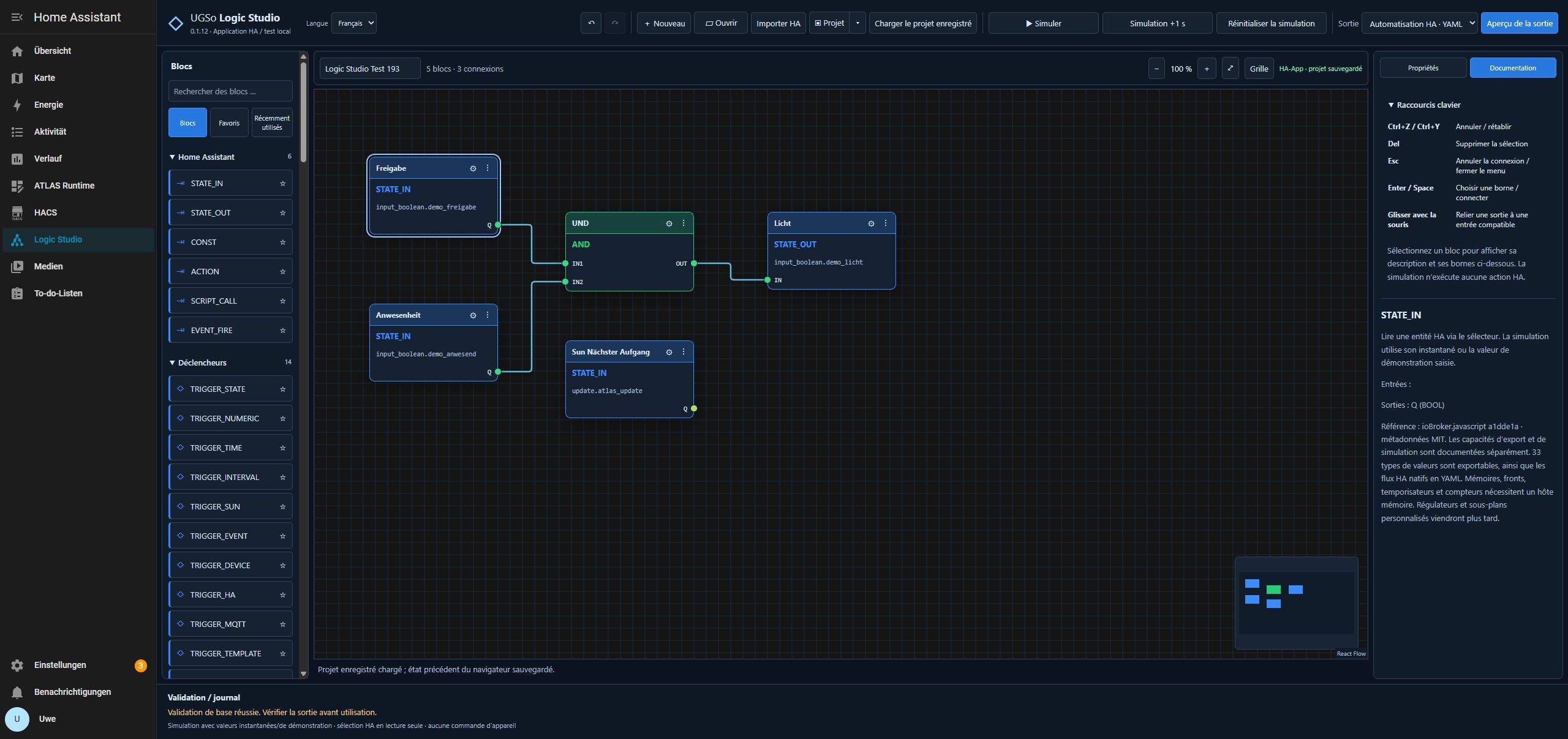
Choose Language → Deutsch / English / Français in the header. Menus, block descriptions, entity picker and import/export dialogs switch without reloading. The choice is saved with browser/app preferences. Custom names, entity IDs, values, port names and generated YAML/JavaScript code are not translated.
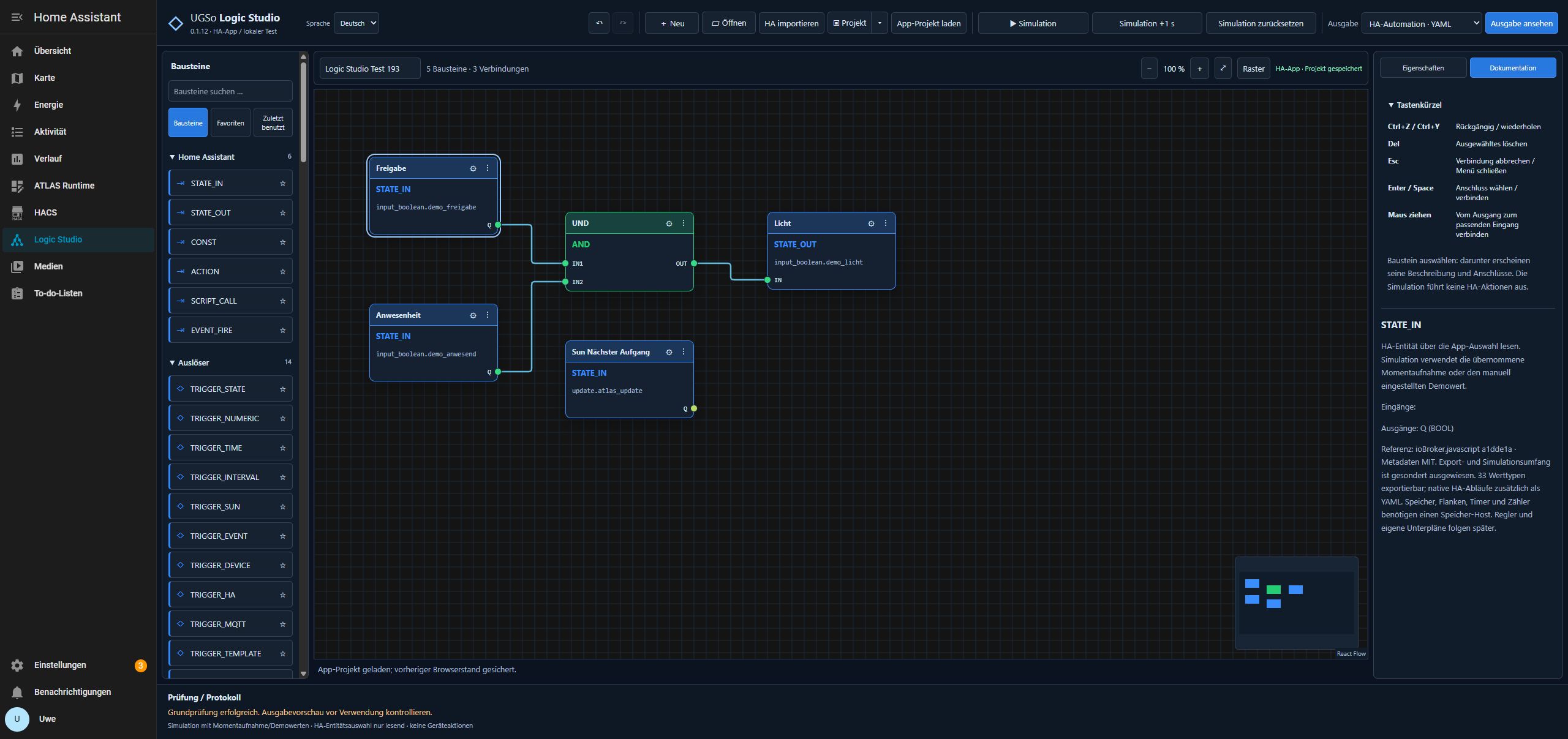
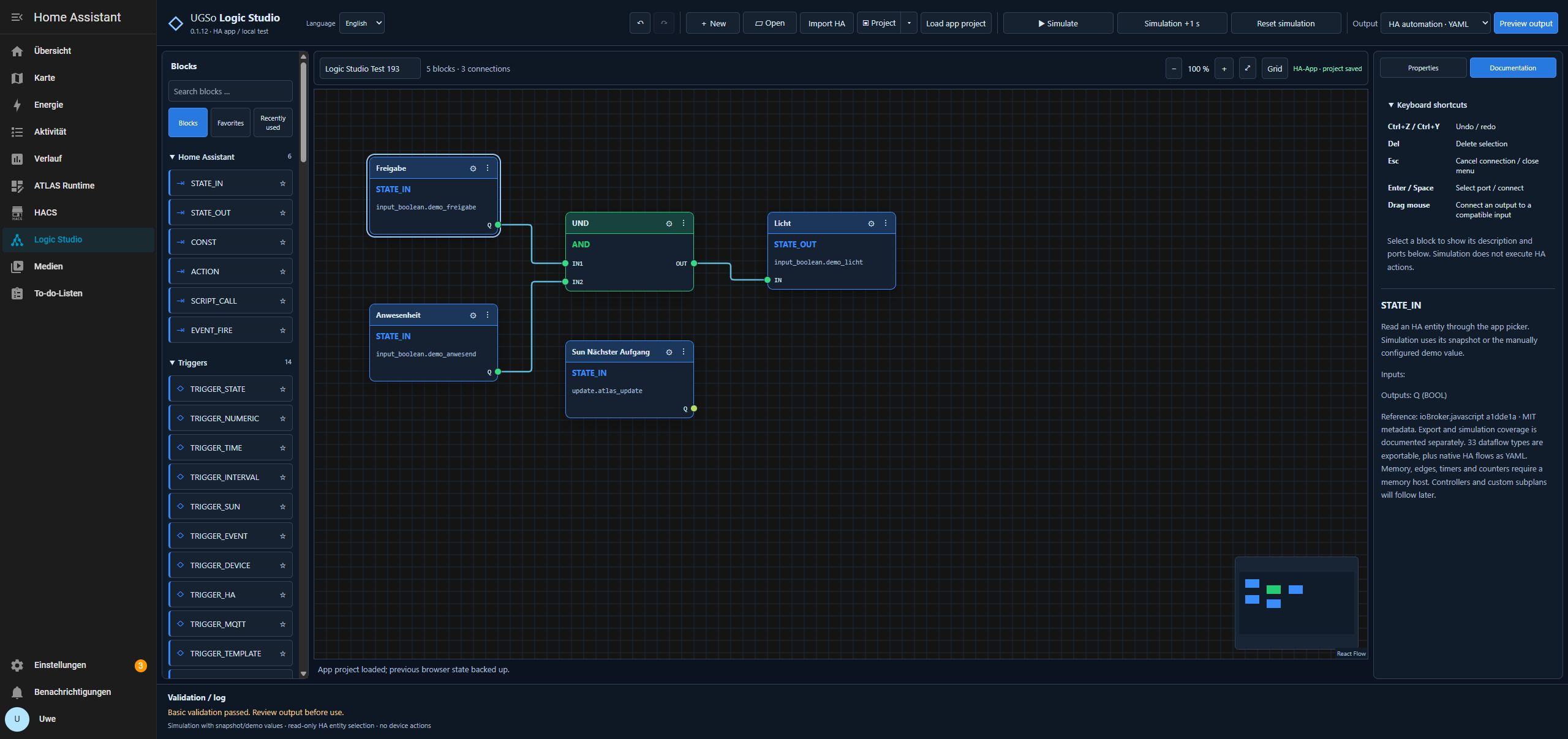
Documentation on the right lists implemented keyboard shortcuts and, when a block is selected, its description and input/output ports. Ctrl+Z / Ctrl+Y: undo/redo; Delete: delete selection; Esc: cancel a connection/close a menu. Use Tab and Enter/Space to select and connect ports. Debugger commands from the ioBroker reference editor are not presented as implemented features.
The toolbar groups Undo/redo → Project → Simulation → Output. The three simulation buttons have equal dimensions and separate borders. The project menu also offers New project and Load example. Open entity selection using the icon beside HA entity ID in STATE_IN/STATE_OUT properties; the previous top entity button is removed.
Two kinds of plan
| Plan | Purpose and output |
|---|---|
| Dataflow | Typed inputs/outputs, logic, math, selection, latches, edges, timers and counters. 33 implemented types; other reference types are marked templates. Export HA automation YAML, HA script YAML or a JavaScript function with a host interface. |
| Native HA flow | Import automations, scripts and blueprints as nested blocks. 53 additional HA types cover triggers, conditions, branches, loops, waits, variables and blueprint inputs. Export native HA YAML only. |
Dataflow simulation uses demo/snapshot values. Persistent blocks need the documented HA text helpers or a JavaScript memory host. Native HA flows are neither executed in the editor nor automatically translated to JavaScript. The JavaScript output is not an ioBroker script.
Drag connections and overview
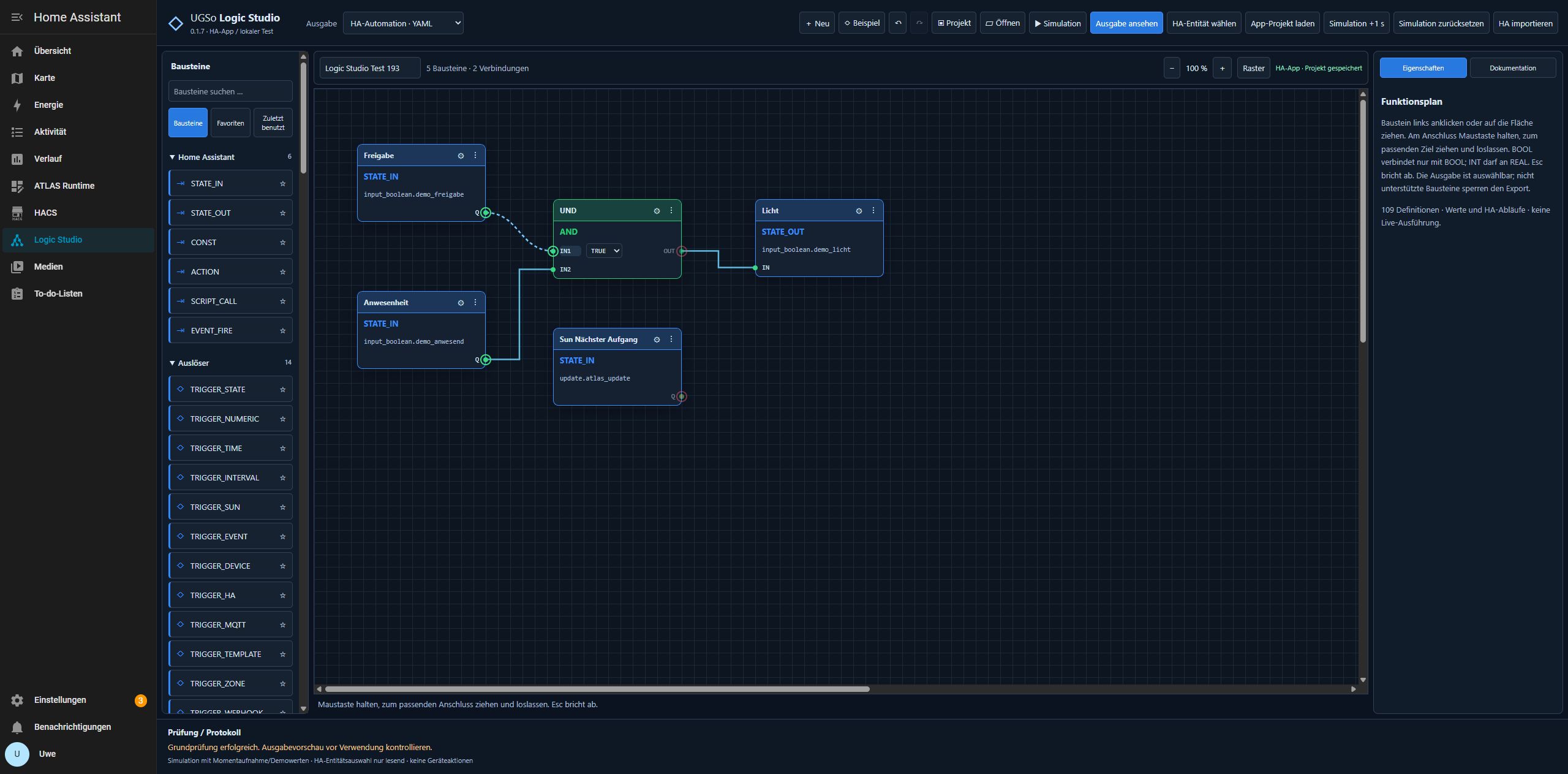
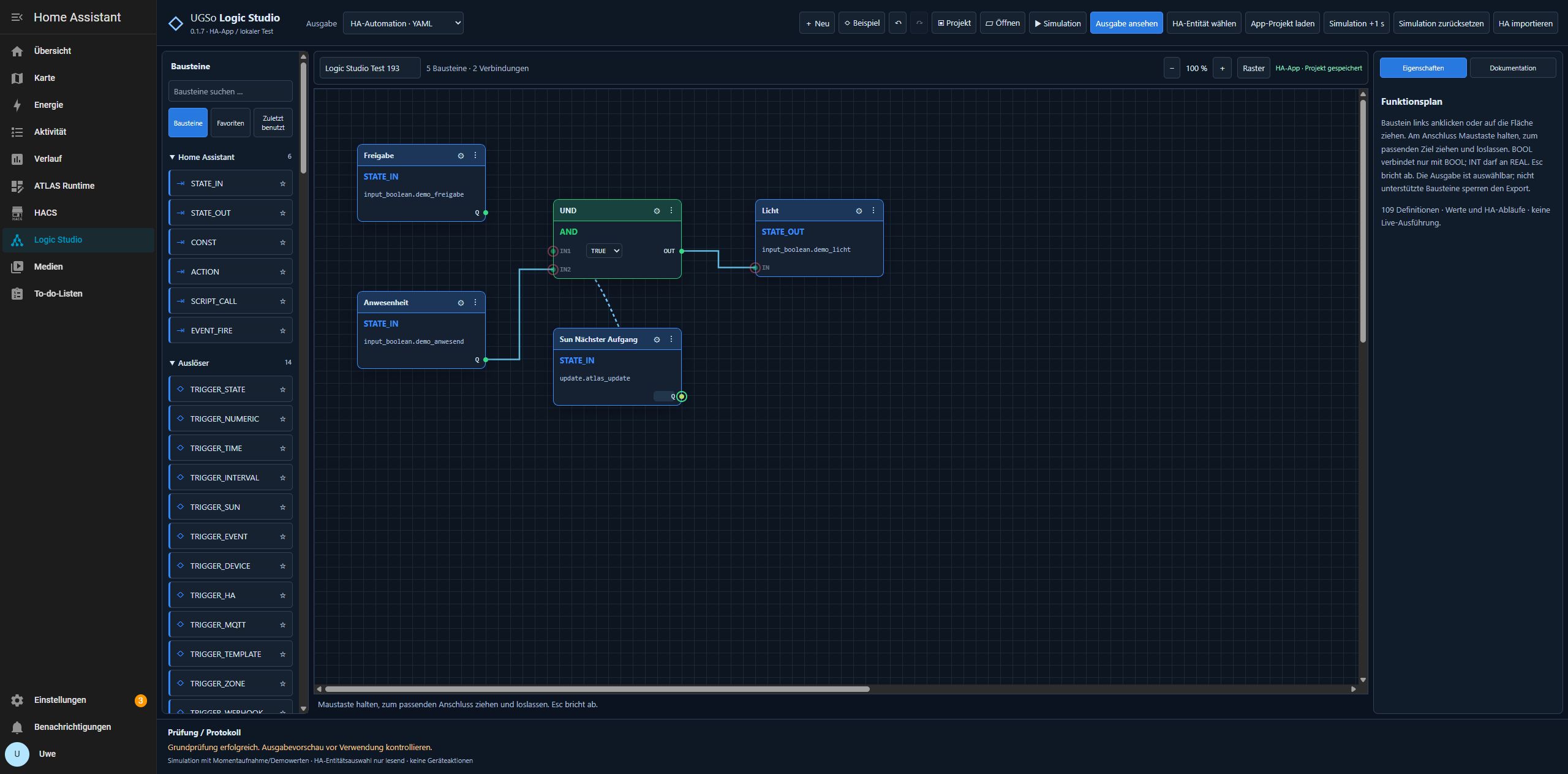
Hold the mouse button on a colored pin, drag to a matching opposite pin and release. The cursor becomes a crosshair and a wire preview follows the mouse. Compatible targets are highlighted green; incompatible or occupied inputs are marked red. Dragging from an input back to an output also works. Esc or releasing on empty canvas cancels; Undo removes a newly created wire.
BOOL connects only to BOOL. Identical signal types are compatible, with additional INT → REAL widening. Explicit ANY pins are universal. Numbers and text are not silently converted to BOOL. Each input accepts exactly one wire; incompatible types, matching pin directions, self-connections and cycles are rejected with an explanation. For keyboard operation, select the output with Tab/Enter, then select the input and press Enter.
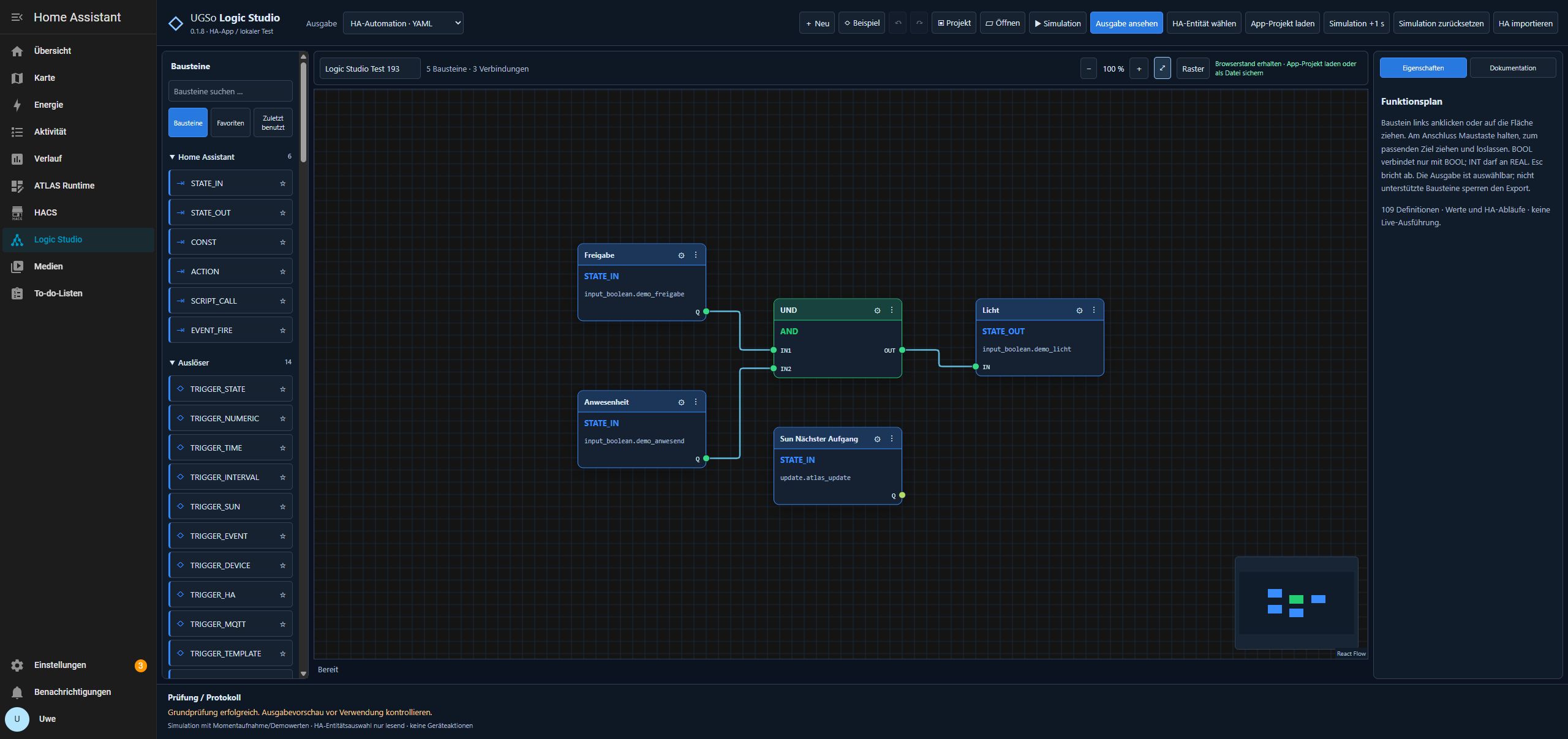
The bottom-right MiniMap shows colored block positions and the visible viewport. Drag inside it to navigate and use the wheel to zoom. Drag empty canvas to pan; +/− change the zoom and Alles anzeigen fits all blocks. Drag a block by its header. The React Flow attribution remains visible at the bottom right. Since 0.1.8 the library actually runs in the editor; domain logic, type validation and exporters remain independent Logic Studio components.
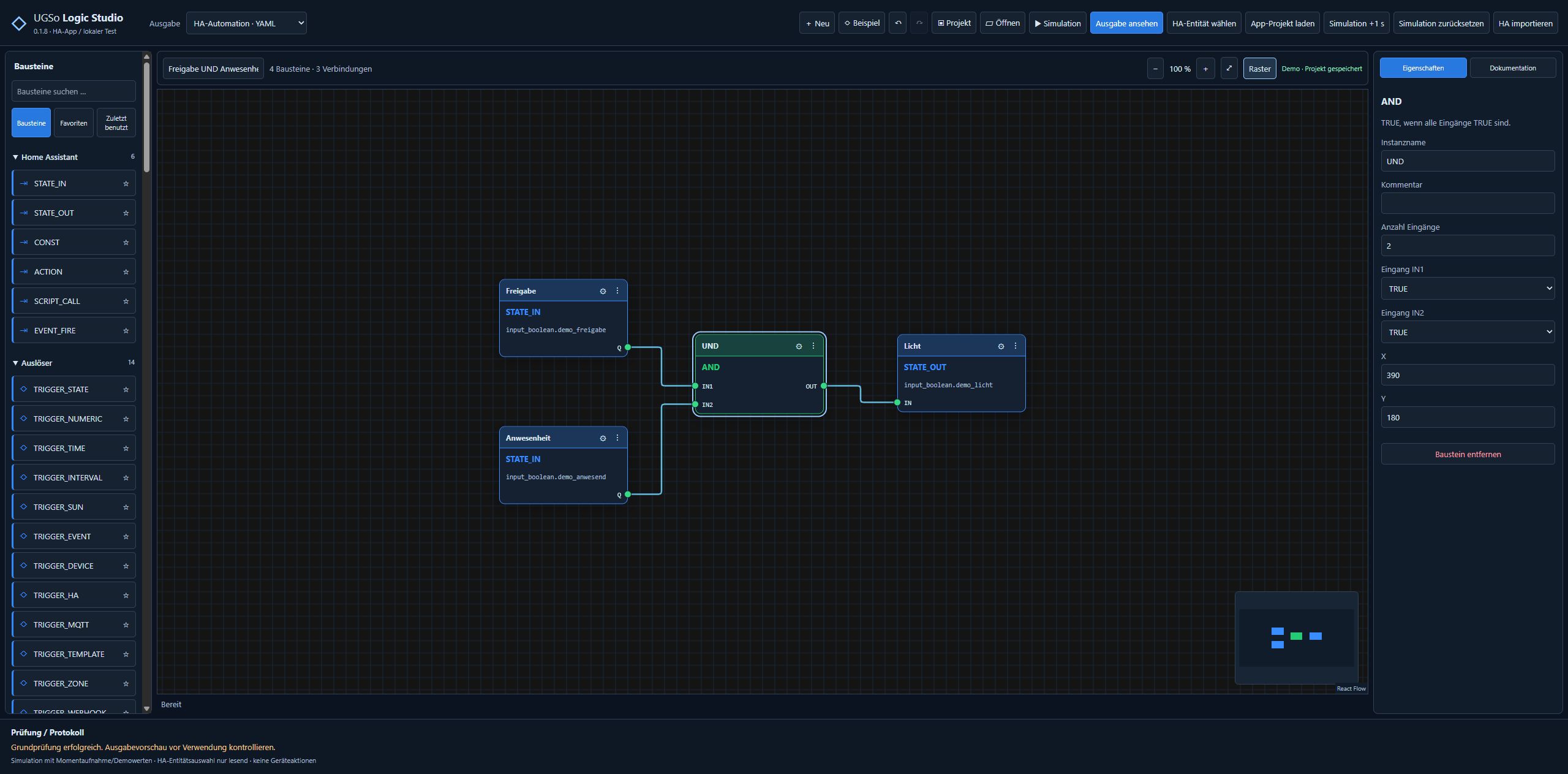
The following images additionally document the earlier 0.1.7 tests.
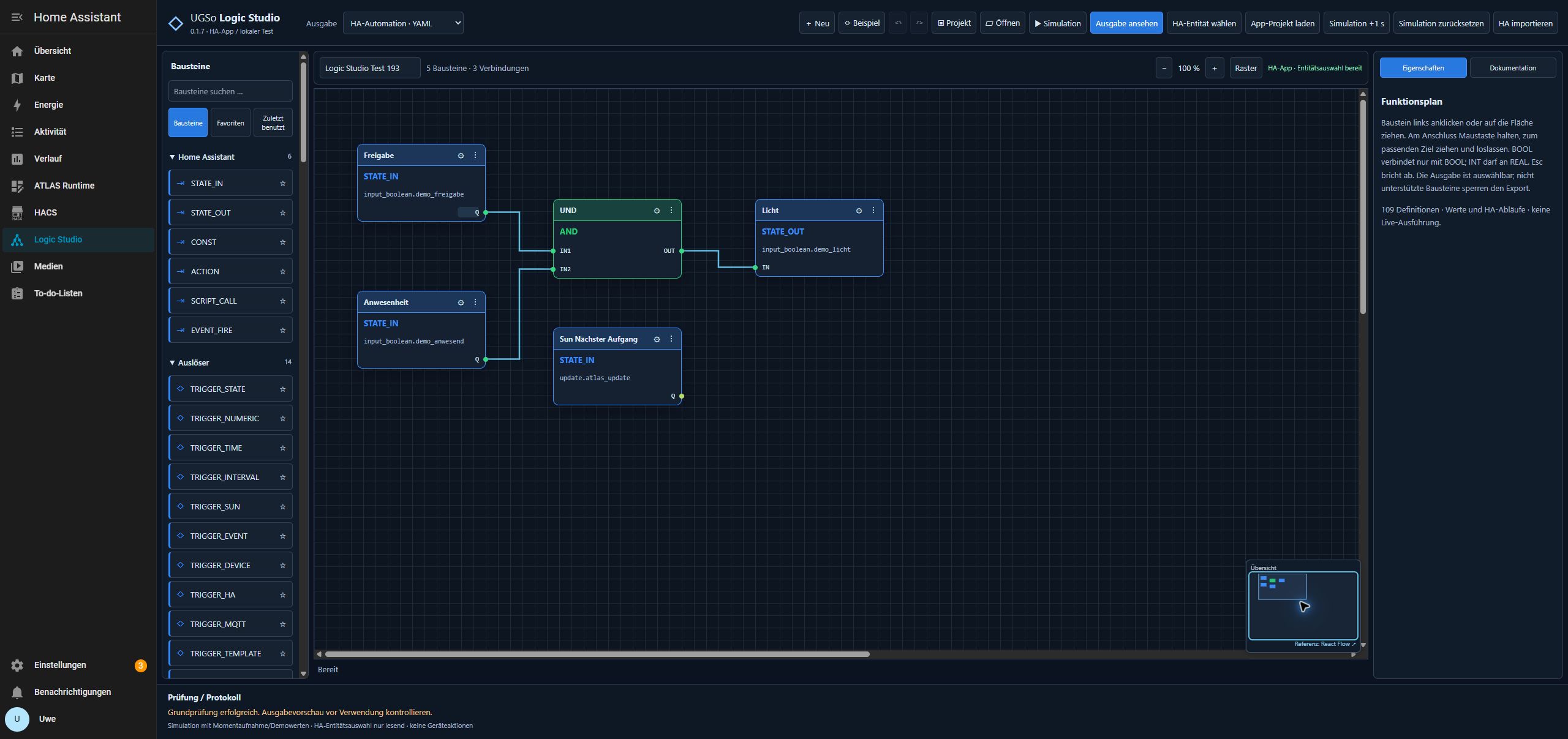
Import and editing
Open HA importieren, choose automations/scripts/blueprints, and use Aus HA einlesen, a YAML/JSON file or pasted text. Select an entry, review its preview, then choose Import übernehmen. Save your existing plan as JSON first; project and source-file backups are also created.
The HA configuration mount is read-only. The app reads automations.yaml, scripts.yaml and blueprint files. Before parsing, sources are copied to /data/ha-source-backups/<timestamp>/ using their original names. secrets.yaml is not opened; !secret and !include remain unresolved. Import referenced include files manually.
Orange FLOW wires represent execution order and branches: branch output → DO, then NEXT → DO. Yellow VALUE/REF wires show blueprint parameters and their !input usage. Properties contain HA configuration and branch paths as JSON. Parameter/field keys must be unique. Unknown sections remain YAML_ORIGINAL; missing wires can block export.
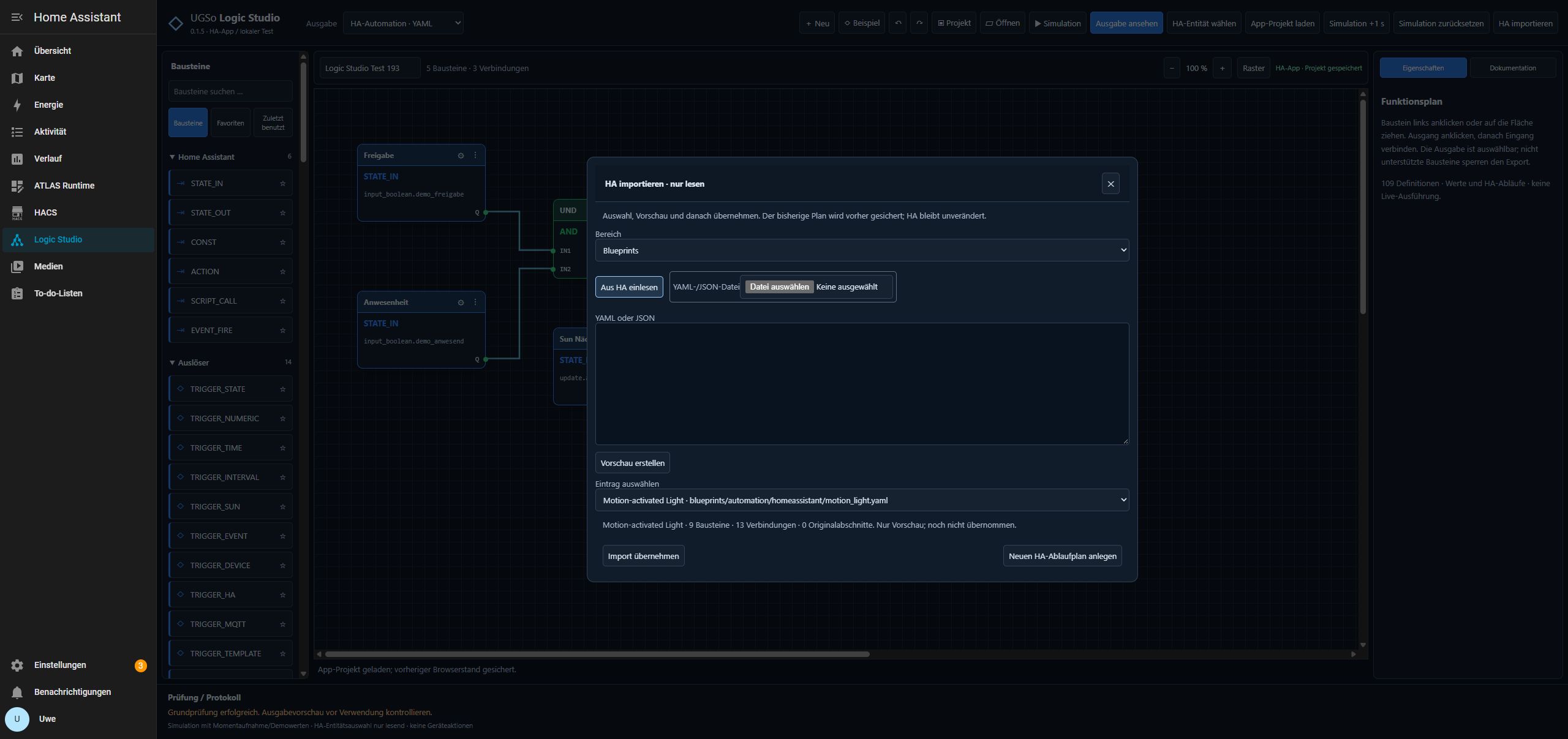
Each block’s ⋮ menu offers Eigenschaften (properties), Duplizieren (duplicate) and Löschen (delete). Duplication copies properties without wires. Deletion removes associated wires; undo restores them. Search, favorites and recently used blocks help navigation.
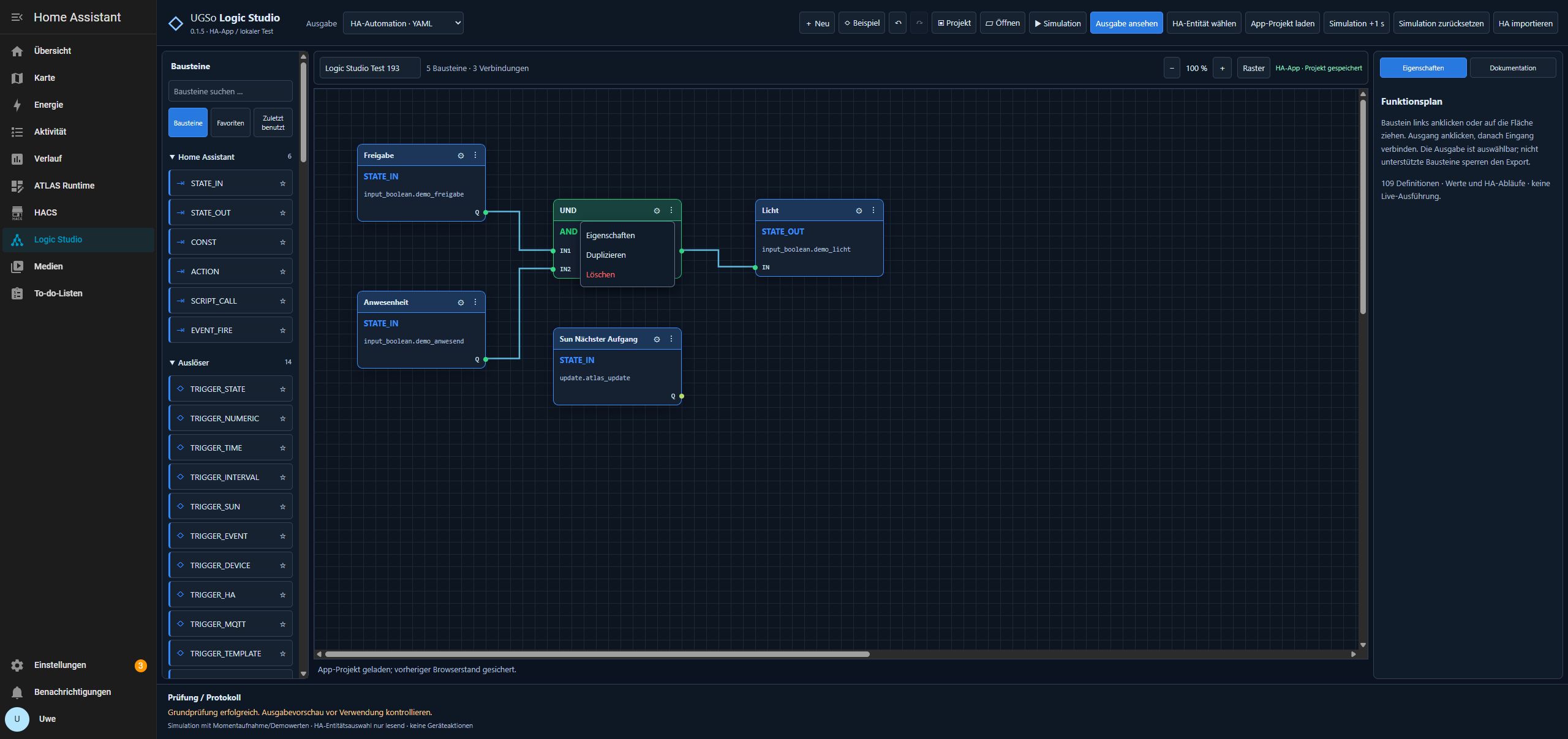
Validation and limits
0.1.12 on the PC (64) test system / HA Core 2026.10.4: Updated the local app from 0.1.8 after a full backup. DE/EN/FR, documentation and real HA entity selection passed. French survived browser reload, app restart and loading the saved app project again; German was restored afterwards. Project JSON differs only in version: all five blocks, three connections, names, values and positions are identical. Generated YAML is identical in EN and FR. No devices controlled. 31 Node and nine Python tests passed. Older reports below remain as history.
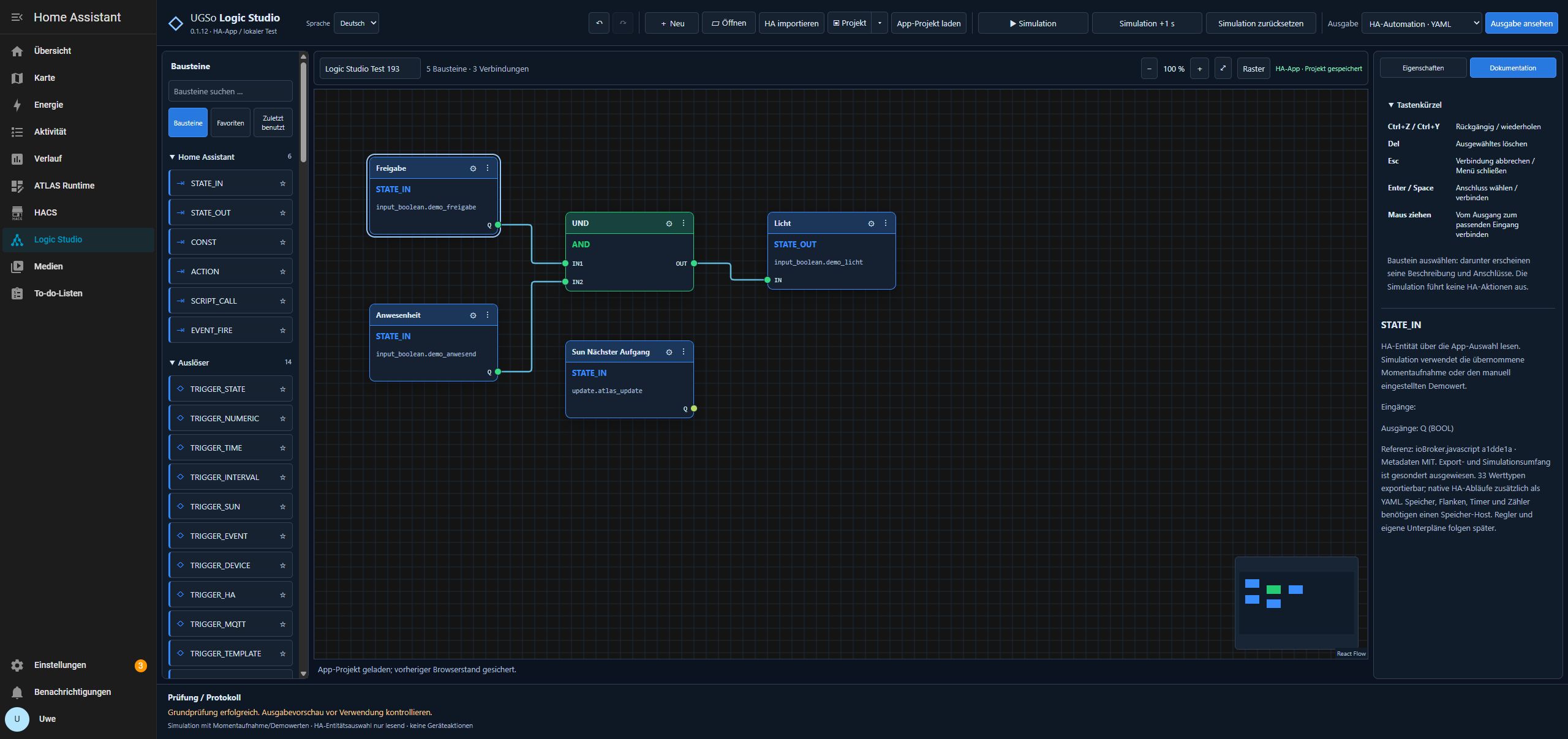
0.1.8 on the PC (64) test system / HA Core 2026.10.4: Updated the existing local app after a full backup. Typed mouse connections, STRING→BOOL rejection, occupied inputs, move/undo, duplicate, zoom and MiniMap passed. The entity picker reads HA entities; a nested script with If/Then/Else, Delay and Stop was imported and exported with its structure preserved. The original plan was restored and compared after reload: all IDs, positions, parameters and three wires unchanged, along with favorites, recent blocks and collapsed categories. No devices were controlled. Docker build and container HTTP smoke test passed, as did 29 Node and eight Python tests. Screenshots show the German UI. Light/dark switching was not manually retested in this step.
The 0.1.5 functional baseline was tested on PC (64) test system / HA Core 2026.10.4: actual blueprint import, automation/script/blueprint fixtures, semantically identical YAML exports and menu actions. 0.1.6 is its first public packaging. 22 Node and eight Python tests cover export, persistence, nested flows and safe source import; GitHub checks also build the container.
0.1.7 on the PC (64) test system / HA Core 2026.10.4: Real mouse-drag tests passed for BOOL → BOOL and the reverse direction. STRING → BOOL and an occupied input were rejected. Overview, click navigation and Home were verified. The original plan was restored and compared with its backup: five blocks, three wires and all palette preferences preserved, including after the local update to 0.1.7. Full HA and separate plan/settings backups were created first; no devices were controlled. 26 Node and eight Python tests currently pass. Screenshots show the German UI.
The editor does not provide complete HA semantic validation: verify targets, templates and selectors in HA. Comments, YAML anchors and formatting are not reconstructed. Import limits: 1 MB, 200 blocks, 500 wires, bounded nesting and up to 250 blueprint files in standard folders. Controllers, calendar and custom subplans partly remain templates.
For local tests, extract the entire release ZIP, install Python 3.10+ and requirements.txt, then run Start-Demo.cmd on Windows. http://127.0.0.1:4180/ shows demo entities without connecting to HA. The ZIP also contains addon/logic_studio/ for local app installations.
Report issues on GitHub with versions, architecture and a minimal anonymized example. Do not publish credentials, personal automations or full backups. Further guides and the test report are included. MIT license; extracted block metadata attribution is in THIRD-PARTY.txt.