Icons stylen
Wenn UI eXtension installiert ist, können die Elemente ha-state-icon, <ha-icon> oder ha-svg-icon über CSS-Variablen angepasst werden. Diese Elemente werden zum Beispiel von tile, entities, glance, heading und vielen weiteren Karten genutzt. UIX kann Icon und Farbe direkt im UIX-Styling einer Karte oder über ein Theme setzen.
Override für eine Entität
Definiere CSS-Variablen in der Form --uix-icon-for-<entity_id> und/oder --uix-icon-color-for-<entity_id>. Dabei wird jeder Punkt . in der Entity-ID durch _ ersetzt. Wenn ein Icon gerendert wird, ersetzt UIX das Icon und/oder die Farbe für die passende Entität.
Templates werden unterstützt. Siehe dazu das vollständige Theme-Beispiel.
TIP
- Die Variable kann auf jeder übergeordneten Ebene im DOM gesetzt werden. UIX erkennt sie über berechnete Styles am Element. Wenn die Variable nicht gesetzt ist oder die Entität nicht passt, bleibt das ursprüngliche Icon unverändert.
- Für Overrides in Home-Assistant-Dashboards setze
--uix-icon-for-<entity_id>und/oder--uix-icon-color-for-<entity_id>in den Theme-Variablenuix-root(-yaml)unduix-more-info(-yaml). - Für Overrides in Konfiguration und UI-Bearbeitung setze
--uix-icon-for-<entity_id>und/oder--uix-icon-color-for-<entity_id>in den Theme-Variablenuix-config(-yaml)unduix-dialog(-yaml). - Für andere durch UIX stylbare Panels setze die Variablen in der passenden Theme-Variable. Für das History-Panel wären das zum Beispiel
uix-history(-yaml).
Generischer Override
Definiere die generischen CSS-Variablen --uix-icon und/oder --uix-icon-color im Kontext des Icons, das du überschreiben möchtest.
Wenn ein Icon gerendert wird, ersetzt UIX dessen Icon und/oder Farbe durch die gesetzten Werte.
Templates werden unterstützt.
TIP
- Wenn sowohl
--uix-iconals auch--uix-icon-for-<entity_id>definiert sind, hat--uix-iconVorrang. - Wenn sowohl
--uix-icon-colorals auch--uix-icon-color-for-<entity_id>definiert sind, hat--uix-icon-colorVorrang. - In manchen Fällen muss in der Kartenkonfiguration bereits ein Icon gesetzt sein, damit UIX es überschreiben kann, zum Beispiel bei der
heading-Karte. Ohne konfiguriertes Icon wird kein Icon gerendert, das UIX ersetzen könnte. - Besondere Vorsicht ist nötig, wenn ein Element mehr als ein Icon im
:hostverwendet, etwa wenn ein Tile-Icon zusätzlich ein Badge hat. Setze in diesem Fall--uix-iconmöglichst spezifisch.
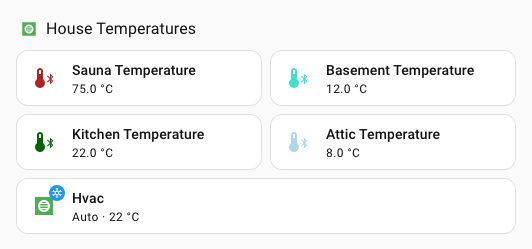
Generisches Override-Beispiel
- type: heading
  heading: House Temperatures
  heading_style: title
  icon: mdi:checkbox-blank-outline
  uix:
    style: |
      ha-icon {
        --uix-icon: {{ 'mdi:hvac' if is_state('climate.hvac', 'auto') else 'mdi:hvac-off' }};
        --uix-icon-color: {{ 'var(--state-climate-auto-color)' if is_state('climate.hvac', 'auto') else 'var(--state-inactive-color)' }};
      }
- type: tile
  entity: sensor.sauna_temperature
  uix:
    style: |
      ha-tile-icon {
        --uix-icon: mdi:thermometer-bluetooth;
        --uix-icon-color:
        {%- set raw = states(config.entity) -%}
        {%- if raw in ['unknown', 'unavailable', 'none'] -%} gray;
        {%- else -%}
        {%- set state = raw|float(-5) -%}
        {%- if state < 5 -%} dodgerblue
        {%- elif state < 10 -%} lightblue
        {%- elif state < 15 -%} turquoise
        {%- elif state < 20 -%} green
        {%- elif state < 25 -%} darkgreen
        {%- elif state < 30 -%} orange
        {%- elif state < 35 -%} crimson
        {%- else -%} firebrick
        {%- endif -%};
        {%- endif -%}
      }
- type: tile
  entity: sensor.basement_temperature
  uix:
    style: |
      ha-tile-icon {
        --uix-icon: mdi:thermometer-bluetooth;
        --uix-icon-color:
        {%- set raw = states(config.entity) -%}
        {%- if raw in ['unknown', 'unavailable', 'none'] -%} gray;
        {%- else -%}
        {%- set state = raw|float(-5) -%}
        {%- if state < 5 -%} dodgerblue
        {%- elif state < 10 -%} lightblue
        {%- elif state < 15 -%} turquoise
        {%- elif state < 20 -%} green
        {%- elif state < 25 -%} darkgreen
        {%- elif state < 30 -%} orange
        {%- elif state < 35 -%} crimson
        {%- else -%} firebrick
        {%- endif -%};
        {%- endif -%}
      }
- type: tile
  entity: sensor.kitchen_temperature
  uix:
    style: |
      ha-tile-icon {
        --uix-icon: mdi:thermometer-bluetooth;
        --uix-icon-color:
        {%- set raw = states(config.entity) -%}
        {%- if raw in ['unknown', 'unavailable', 'none'] -%} gray;
        {%- else -%}
        {%- set state = raw|float(-5) -%}
        {%- if state < 5 -%} dodgerblue
        {%- elif state < 10 -%} lightblue
        {%- elif state < 15 -%} turquoise
        {%- elif state < 20 -%} green
        {%- elif state < 25 -%} darkgreen
        {%- elif state < 30 -%} orange
        {%- elif state < 35 -%} crimson
        {%- else -%} firebrick
        {%- endif -%};
        {%- endif -%}
      }
- type: tile
  entity: sensor.attic_temperature
  uix:
    style: |
      ha-tile-icon {
        --uix-icon: mdi:thermometer-bluetooth;
        --uix-icon-color:
        {%- set raw = states(config.entity) -%}
        {%- if raw in ['unknown', 'unavailable', 'none'] -%} gray;
        {%- else -%}
        {%- set state = raw|float(-5) -%}
        {%- if state < 5 -%} dodgerblue
        {%- elif state < 10 -%} lightblue
        {%- elif state < 15 -%} turquoise
        {%- elif state < 20 -%} green
        {%- elif state < 25 -%} darkgreen
        {%- elif state < 30 -%} orange
        {%- elif state < 35 -%} crimson
        {%- else -%} firebrick
        {%- endif -%};
        {%- endif -%}
      }
- type: tile
  entity: climate.hvac
  grid_options:
    columns: 12
    rows: 1
  uix:
    style: |
      ha-state-icon {
        --uix-icon: {{ 'mdi:hvac' if is_state('climate.hvac', 'auto') else 'mdi:hvac-off' }};
        --uix-icon-color: {{ 'var(--state-climate-auto-color)' if is_state('climate.hvac', 'auto') else 'var(--state-inactive-color)' }};
      }
Vollständiges Theme-Beispiel
Dieses Beispiel nutzt zwei Makros im UIX-Theme und wendet diese Makros in den Theme-Variablen uix-root-yaml und uix-more-info-yaml an. Obwohl als Selektor nur .: verwendet wird, nutzt das Beispiel die -yaml-Varianten, da diese oft bereits in Themes vorhanden sind.
Theme:
uix-doc-icon-for-entity-theme:
  uix-theme: uix-doc-icon-for-entity-theme
  uix-macros-yaml: |
    temp_icon_color:
      params:
        - entity_id
      template: >
        {%- set entityString = entity_id.replace('.','_') -%}
        --uix-icon-for-{{ entityString }}: mdi:thermometer-bluetooth;
        --uix-icon-color-for-{{ entityString }}:
        {%- set raw = states(entity_id) -%}
        {%- if raw in ['unknown', 'unavailable', 'none'] -%} gray;
        {%- else -%}
        {%- set state = raw|float(-5) -%}
        {%- if state < 5 -%} dodgerblue
        {%- elif state < 10 -%} lightblue
        {%- elif state < 15 -%} turquoise
        {%- elif state < 20 -%} green
        {%- elif state < 25 -%} darkgreen
        {%- elif state < 30 -%} orange
        {%- elif state < 35 -%} crimson
        {%- else -%} firebrick
        {%- endif -%};
        {%- endif -%}
    temp_icon_color_all:
      template: >
        {% set entities = states.sensor
          | selectattr('attributes.device_class', 'defined')
          | selectattr('attributes.device_class', 'eq', 'temperature')
          | selectattr('attributes.state_class', 'defined')
          | selectattr('attributes.state_class', 'eq', 'measurement')
          | map(attribute='entity_id') | list %}
        {% for entity in entities %}
          {{ temp_icon_color(entity) }}
        {% endfor %}

  uix-root-yaml: |
    .: |
      :host {
        {{ temp_icon_color_all() }}
      }

  uix-more-info-yaml: |
    .: |
      :host {
        {{ temp_icon_color_all() }}
}TIP
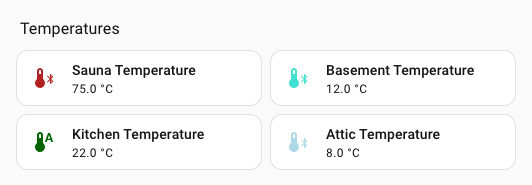
--uix-icon und --uix-icon-color haben Vorrang vor --uix-icon-for-<entity_id> und/oder --uix-icon-color-for-<entity_id>. Siehe dazu die Tile-Karte sensor.kitchen_temperature im Beispiel.
Dashboard-Karten als Section:
type: grid
cards:
  - type: heading
    heading: Temperatures
    heading_style: title
  - type: tile
    entity: sensor.sauna_temperature
    icon: ''
    vertical: false
    features_position: bottom
  - type: tile
    entity: sensor.basement_temperature
  - type: tile
    entity: sensor.kitchen_temperature
    uix:
      style: |
        ha-tile-icon {
          {% if is_state('climate.hvac', 'auto') %}
            --uix-icon: mdi:thermometer-auto;
          {% endif %}
        }
  - type: tile
    entity: sensor.attic_temperature