
UIX Actions
UIX Actions erweitern Home-Assistant-Actions um zusätzliche Frontend-Funktionen. Sie können in normalen Home-Assistant-Action-Konfigurationen genutzt werden, wenn ein Element fire-dom-event auslöst und darunter ein uix-Action-Block steht.
INFO
UIX Actions laufen im Browser. Sie eignen sich für Frontend-Aktionen wie Cache leeren, More-info öffnen, Toast anzeigen oder JavaScript ausführen.
Grundform:
# ... card config
tap_action:
  action: fire-dom-event
  uix:
    action: toast
    data:
message: Hallo von UIXINFO
Die genaue Unterstützung hängt davon ab, ob die jeweilige Karte fire-dom-event weiterleitet. Viele Custom Cards tun das, Standardkarten je nach Action-Kontext.
clear-cache: Home-Assistant-Frontend-Cache leeren
| Konfiguration | Einstellung | Standard | Beschreibung |
|---|---|---|---|
action: clear-cache | - | - | Leert den Home-Assistant-Application-Cache und lädt den Browser neu. |
data: | - | - | Wird nicht verwendet. |
tap_action:
  action: fire-dom-event
  uix:
action: clear-cacheWenn ein Forge-Form-Spark die Aktion event auslöst, werden seine aktuellen Formularwerte den Aktionsdaten und damit dem detail des Events hinzugefügt.
event: Browser-Event auslösen
Diese Action sendet ein CustomEvent auf window. Damit können Dashboard-Aktionen Broker-Interaktionen im Realm browser auslösen, ohne einen weiteren fire-dom-event-Listener zu entpacken. name ist erforderlich, data ist das Event-detail und standardmäßig {}.
type: button
name: YAML umschalten
tap_action:
  action: fire-dom-event
  uix:
    action: event
    name: toggle-yaml-mode
    data:
source: dashboard-buttonBei einer Broker-button-Direktive wird stattdessen automatisch vom Platzierungsbezug (after, before oder Direktiven-Anchor) mit bubbles: true und composed: true gesendet. Empfangende Interaktionen können dadurch target, < oder <$ aus dem Eventpfad verwenden, statt absolute select_tree-Pfade erneut zu suchen. Bei Auslösung durch den Form Spark werden aktuelle Formularwerte an data angehängt und Eigenschaften von detail.
more-info: More-info für eine Entität mit Startansicht öffnen
| Konfiguration | Einstellung | Standard | Beschreibung |
|---|---|---|---|
action: more-info | - | - | Öffnet den Home-Assistant-More-info-Dialog mit den Optionen aus data. |
data: | - | - | Entity- und View-Optionen für More-info. |
entity | - | Entity-ID, für die More-info geöffnet wird. | |
view | info | Startansicht: info, history, settings, related, add_to, details. |
tap_action:
  action: fire-dom-event
  uix:
    action: more-info
    data:
      entity: light.bed_light
view: historytoast: Home-Assistant-Toast anzeigen
| Konfiguration | Einstellung | Standard | Beschreibung |
|---|---|---|---|
action: toast | - | - | Zeigt eine Home-Assistant-Toast-Benachrichtigung mit Optionen aus data. |
data: | - | - | Toast-Optionen. |
id | - | ID der Toast-Nachricht. Gleiche ID ersetzt eine vorhandene Nachricht. | |
message | Pflicht | String oder Übersetzungsobjekt mit translationKey und optionalen args. | |
duration | 4000 | Dauer in ms. Werte unter 4000 werden auf 4000 gesetzt. -1 zeigt den Toast unbegrenzt. | |
dismissable | false | Zeigt ein Schließen-Icon. | |
bottomOffset | 0 | Zusätzlicher Abstand vom unteren Fensterrand. | |
action | - | Optionale Schaltfläche mit action.tap_action. | |
action.primary | - | Rendert die Action-Schaltfläche im Primary-Stil. | |
action.text | Pflicht | Text oder Übersetzungsobjekt für die Action. | |
action.tap_action | Pflicht | Home-Assistant-Action-Konfiguration. | |
secondary_action | - | Zweite Schaltfläche links neben action. | |
secondary_action.primary | - | Rendert die zweite Schaltfläche im Primary-Stil. | |
secondary_action.text | Pflicht | Text oder Übersetzungsobjekt für die zweite Action. | |
secondary_action.tap_action | Pflicht | Home-Assistant-Action-Konfiguration. |
tap_action:
  action: fire-dom-event
  uix:
    action: toast
    data:
      id: uix-demo
      message: UIX wurde ausgeführt
      duration: 5000
      dismissable: true
      action:
        text: Details
        tap_action:
          action: more-info
entity: light.bed_lightpopover — verankertes Home-Assistant-Popover anzeigen
Vorschau ab 9.0.0-beta.7
timeout benötigt Home Assistant 2026.11.0b0 oder neuer.
Zeigt ein adaptives Home-Assistant-Popover neben dem Element an, das die Aktion ll-custom ausgelöst hat. Es enthält den standardmäßigen barrierefreien Schließen-Button von Home Assistant und entfernt sich nach dem Schließen.
| Konfiguration | Einstellung | Standard | Beschreibung |
|---|---|---|---|
action: popover | — | — | Zeigt ein adaptives Popover mit den Optionen aus data:. |
data: | — | — | Popover-Optionen. |
target | Aktionsquelle | DOM-Element, neben dem das Popover erscheint. none zeigt einen zentrierten adaptiven Dialog unter Home Assistants Shadow Root. | |
title | — | Setzt headerTitle. | |
subtitle | — | Setzt headerSubtitle. | |
subtitle_position | below | Setzt header-subtitle-position: above oder below. | |
width | small | Breite: small, large oder full. | |
timeout | 0 | Schließt das Popover automatisch nach dieser Anzahl Millisekunden seit dem Öffnen. Weglassen oder 0 deaktiviert den Timer. Erlaubt sind ganze Zahlen von 0 bis 2147483647. | |
without_header | false | Verbirgt Kopfzeile und Schließen-Button. Escape schließt weiterhin, sofern dismissible nicht false ist. | |
dismissible | true | Erlaubt Schließen-Button, Escape und Schließen durch Klicken außerhalb. Bei false ist ein Footer-Button erforderlich. dismissable wird als Alias akzeptiert. | |
content | — | HTML-Inhalt; kann nicht gemeinsam mit card verwendet werden. | |
card | — | Home-Assistant-Kartenkonfiguration; kann nicht gemeinsam mit content verwendet werden. | |
style | — | Flache Zuordnung von CSS-Eigenschaften zu Zeichenketten oder Zahlen; wird inline auf ha-adaptive-popover angewendet. | |
uix | — | UIX-Styling als dialog mit der Klasse type-uix-popover. | |
icons | — | Liste reiner Icon-Buttons in der Kopfzeile. Jeder Eintrag benötigt icon. | |
buttons | — | Optionale Footer-Buttons. Bei dismissible: false ist mindestens einer erforderlich. | |
buttons.primary | — | Button am primären Footer-Ende; Standard: variant: brand, appearance: accent. | |
buttons.secondary | — | Button vor dem primären Button; Standard: variant: neutral, appearance: filled. |
buttons.primary und buttons.secondary verwenden die Einstellungen des Forge-Button-Sparks, außer dessen Platzierungseinstellungen. Möglich sind label, icon, start_icon, end_icon, entity, size, variant, appearance, tap_action, hold_action und double_tap_action. Die Positionen folgen der Schreibrichtung: Der primäre Button steht bei Links-nach-rechts rechts, bei Rechts-nach-links links. Ein Button mit Aktion schließt das Popover nach ihrer Ausführung; ein Button ohne Aktion schließt es beim Klicken.
Enthält die Karte einen Forge-Form-Spark, werden dessen aktuelle Formularwerte den Aktionsdaten beider Footer-Buttons hinzugefügt. Der Form-Spark kann dabei auf eigene Absenden- und Leeren-Buttons verzichten.
Mit timeout: 20000 schließt das Popover nach 20 Sekunden. Jedes Popover hat einen eigenen Timer, der beim Öffnen beginnt und beim vorzeitigen Schließen aufgehoben wird. Interaktionen setzen den Timer nicht zurück. Er schließt auch bei dismissible: false, führt aber keine Footer-Aktionen aus und sendet keine Formulare ab.
type: button
name: Quick controls
tap_action:
  action: fire-dom-event
  uix:
    action: popover
    data:
      title: Bed light
      timeout: 20000
      card:
        type: tile
entity: light.bed_lightMit target: none erscheint derselbe Inhalt als zentrierter adaptiver Dialog. Integrationen oder benutzerdefinierte Aufrufer können ein tatsächliches DOM-Element als target übergeben, um einen anderen Anchor zu wählen.
Jeder Eintrag unter icons verwendet Home Assistants runden Icon-Button und benötigt icon. label definiert den barrierefreien Namen. Unterstützt werden entity, color, tap_action, hold_action und double_tap_action. Header-Icons schließen das Popover nicht und eignen sich beispielsweise für Einstellungen oder Hilfe.
style setzt direkte Eigenschaften des Popovers; uix gestaltet Kopfzeile, Footer und andere interne Elemente mit der üblichen UIX-DOM-Navigation. Die Aktionsdaten stehen Templates als config zur Verfügung. Eine mit card erzeugte Karte erhält die Klasse uix-popover-card. Mit .uix-popover-card setzt du CSS-Variablen direkt auf dem Karten-Host; ".uix-popover-card $" erreicht das Innere seines Shadow Roots.
Dieses Originalbeispiel zeigt HTML-Inhalt beim Betätigen eines Buttons:
type: button
show_icon: false
name: Popover
tap_action:
  action: fire-dom-event
  uix:
    action: popover
    data:
      title: Bed light
      subtitle: Quick controls
      subtitle_position: above
      width: small
      content: |
        <p>You can toggle the light using the primary action.</p>
        <p>You can navigate to config/dashboard with the cog icon.</p>
      style:
        "--ha-dialog-border-radius": 12px
      uix:
        style:
          "$": |
            .content-wrapper {
              --dialog-content-padding: 0 var(--ha-space-6) var(--ha-space-6);
            }
      icons:
        - icon: mdi:cog
          label: Settings
          tap_action:
            action: navigate
            navigation_path: /config/dashboard
      buttons:
        secondary:
          label: Cancel
        primary:
          label: Toggle
          entity: light.bed_light
          tap_action:
            action: toggle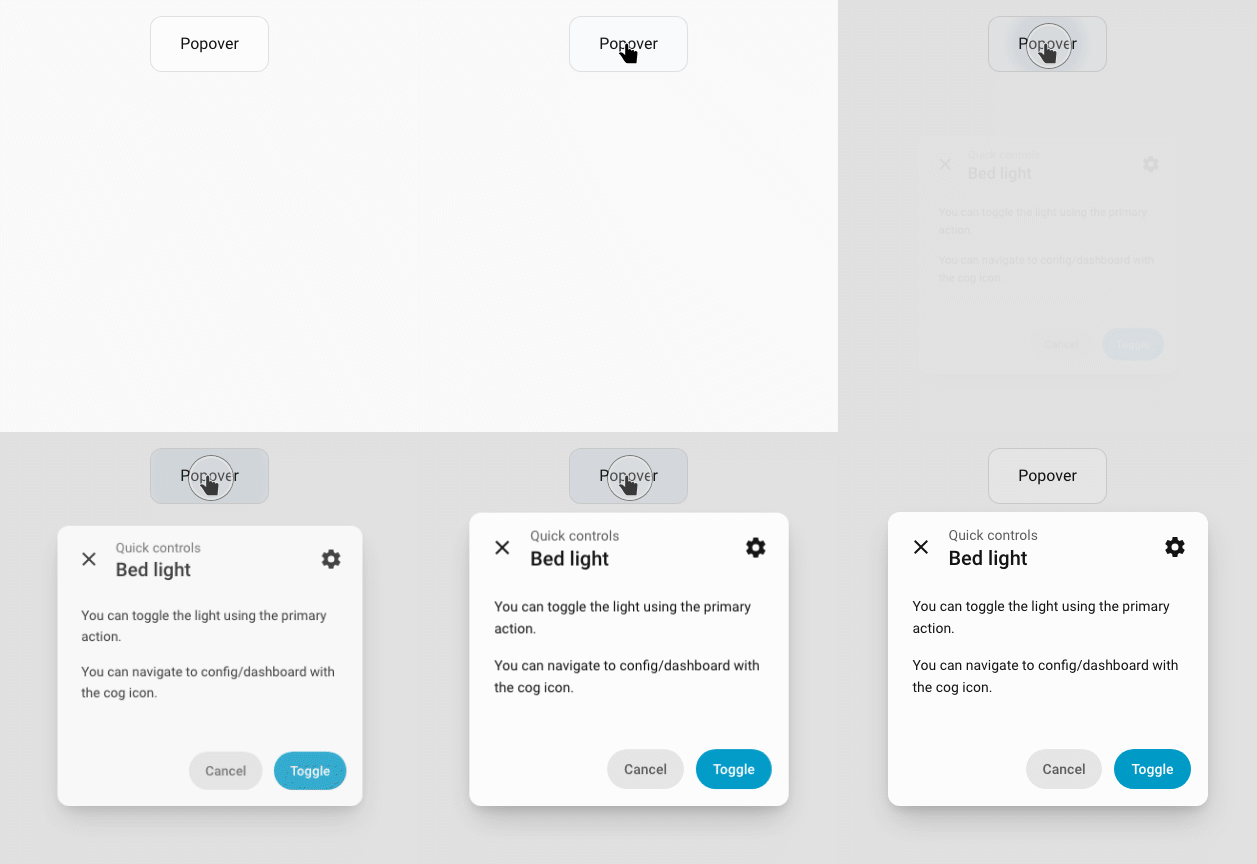
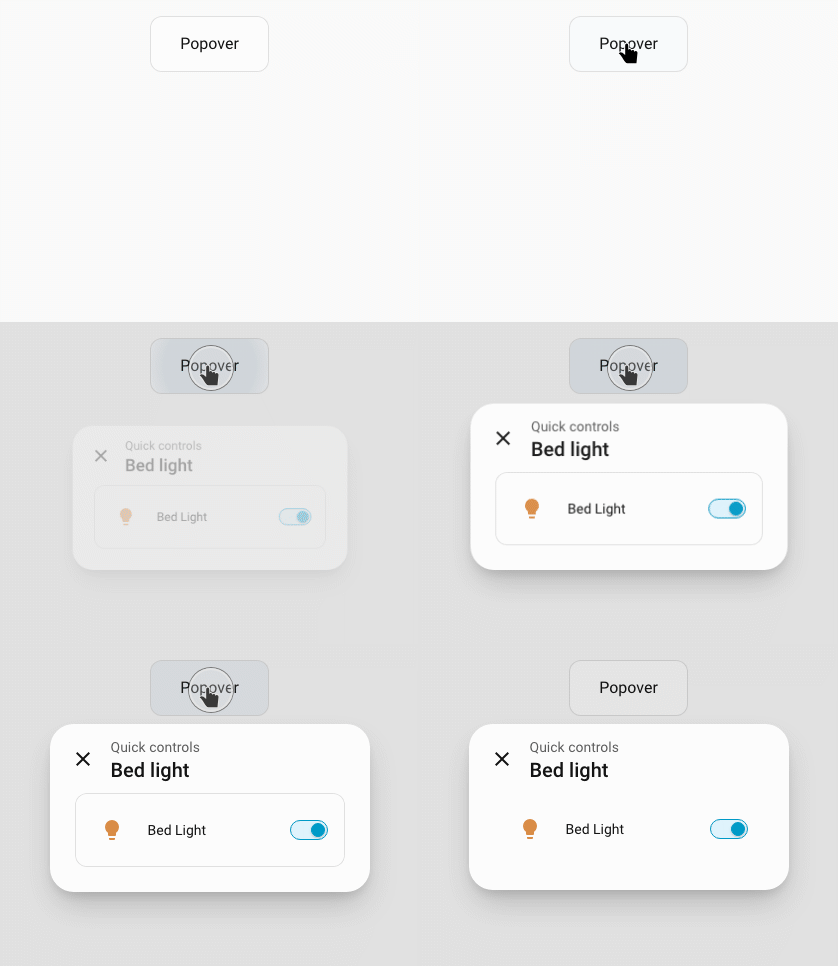
Ersetze content durch card, um eine Karte anzuzeigen. Das folgende Originalbeispiel entfernt außerdem Rahmen und Hintergrund der Karte:
type: button
show_icon: false
name: Popover
tap_action:
  action: fire-dom-event
  uix:
    action: popover
    data:
      title: Bed light
      subtitle: Quick controls
      subtitle_position: above
      width: small
      card:
        type: entities
        entities:
          - light.bed_light
      uix:
        style: |
          .uix-popover-card {
            --ha-card-border-width: 0px;
            --ha-card-background: none;
          }
javascript: JavaScript in der Browser-Session ausführen
Die Aktion erhält hass sowie das optionale Objekt variables. Beispielsweise kann Code über hass.callService(...) einen Dienst aufrufen. Er läuft mit den im aktuellen Browser verfügbaren HA-Daten und Berechtigungen.
WARNING
Führe JavaScript nur aus vertrauenswürdigen UIX-Konfigurationen aus. JavaScript läuft im Browserkontext.
| Konfiguration | Einstellung | Standard | Beschreibung |
|---|---|---|---|
action: javascript | - | - | Führt JavaScript-Code mit Optionen aus data aus. |
data: | - | - | JavaScript-Optionen. |
code | Pflicht | Auszuführender JavaScript-Code. | |
variables | {} | Optionales Variablenobjekt. Jede benannte Variable ist als variables.<name> verfügbar. |
tap_action:
  action: fire-dom-event
  uix:
    action: javascript
    data:
      variables:
        entity: light.bed_light
      code: |
console.log('UIX JavaScript action', variables.entity)Wenn ein Forge-Form-Spark die Aktion javascript auslöst, werden seine aktuellen Werte data.variables hinzugefügt. Im Code sind sie als variables.<Feldname> verfügbar.
locked_action: Aktion erst nach Code oder Bestätigung ausführen
Verfügbar ab UIX 8.3.0-beta.2
Seit 8.3.0-beta.2 verfügbar und in der stabilen Version UIX 8.4.0 enthalten.
locked_action führt eine normale Home-Assistant-Action erst aus, nachdem der aktuelle Benutzer die konfigurierte Sperre passiert hat. Das eignet sich beispielsweise für Neustarts, Tore oder wichtige Einstellungen, ohne die gesamte Karte in einen Forge Lock zu hüllen.
type: button
name: Home Assistant neu starten
tap_action:
  action: fire-dom-event
  uix:
    action: locked_action
    data:
      locks:
        - code: 1234
          admins: true
      locked_action:
        action: perform-action
perform_action: homeassistant.restartSchutz vor versehentlicher Bedienung
Die Sperre wirkt im Frontend und ist keine Berechtigungsgrenze. Wer das Dashboard bearbeiten oder seine geladene Konfiguration untersuchen kann, sieht den Code und die geschützte Action. Für Zugriffsschutz sind Home-Assistant-Berechtigungen und serverseitige Kontrollen erforderlich.
Konfiguration
| Schlüssel | Typ | Standard | Beschreibung |
|---|---|---|---|
locked_action | object | — | Pflicht: Home-Assistant-Action nach bestandener Sperre. |
locks | list | [] | Geordnete Liste der Sperreinträge; siehe Zuordnung. |
permissive | boolean | false | Bei true dürfen Benutzer ohne passenden Eintrag die Aktion ausführen. |
entity | string | — | Entity-ID für eine verschachtelte Action, die eine Karten-Entity verwendet. |
code_dialog | object | — | Beschriftungen für die Code-/Passphrase-Abfrage. |
id | string oder number | — | Stabile Kennung für Fehlversuche und Sperrzeiten; bei retry_delay oder max_retries dringend empfohlen. Pro geschützter Action eine eigene ID verwenden. |
locked_action akzeptiert normale Home-Assistant-Action-Objekte, darunter perform-action, toggle, more-info, navigate und fire-dom-event.
Zuordnung der Sperren
locks wird in Reihenfolge geprüft. Der erste passende aktive Eintrag bestimmt die Abfrage. Passt kein aktiver Eintrag, erlaubt der erste passende Eintrag mit active: false die Aktion ohne Abfrage.
| Konfiguration | Passende Benutzer |
|---|---|
users vorhanden | Benutzer mit einem Namen in der Liste; mit admins: true zusätzlich alle Administratoren. |
Ohne users | Alle Nicht-Administratoren außer den unter except genannten Benutzern. |
Ohne users, mit admins: true | Alle Benutzer außer den unter except genannten Benutzern. |
admins erweitert die Zuordnung: Ohne diese Option sind Administratoren ausgeschlossen, sofern sie nicht in users stehen. Passt kein Sperreintrag, erlaubt permissive: true die Aktion. Beim Standard permissive: false umgehen Administratoren die Bediensperre; Nicht-Administratoren dürfen die Aktion nicht ausführen.
Schlüssel eines Sperreintrags
| Schlüssel | Typ | Standard | Beschreibung |
|---|---|---|---|
active | boolean | true | false erlaubt passenden Benutzern die Aktion ohne Abfrage. |
code | string oder number | — | Einzugebender Code. Rein numerische Codes öffnen den HA-Ziffernblock, andere Werte ein Passwortfeld. |
pin | string oder number | — | Alias für code. |
confirmation | string, boolean oder object | — | Bestätigung nach einer eventuellen Code-Abfrage. true verwendet den HA-Standardtext; ein String eigenen Text, ein Objekt title und text. |
users | Liste von Strings | — | Namen der Benutzer, für die der Eintrag gilt. |
admins | boolean | false | Bezieht zusätzlich Administratoren ein; ohne users gilt der Eintrag dadurch für alle Benutzer. |
except | Liste von Strings | — | Ausgenommene Benutzernamen bei Einträgen ohne users. |
retry_delay | number oder string | — | Wartezeit nach falschem Code; Zahl in Millisekunden oder String mit Einheit, etwa "10s". |
max_retries | number | — | Erlaubte Fehlversuche vor der längeren Sperre. |
max_retries_delay | number oder string | 30000 | Sperrdauer nach max_retries; Millisekunden oder etwa "30s" / "5m". |
Code-Dialog
Mit code_dialog werden die Texte für Code- und Passphrase-Abfragen angepasst:
| Schlüssel | Typ | Standard | Beschreibung |
|---|---|---|---|
title | string | Home-Assistant-Standard | Dialogtitel. |
submit_text | string | Home-Assistant-Standard | Beschriftung der Bestätigungsschaltfläche. |
cancel_text | string | Home-Assistant-Standard | Beschriftung der Abbruchschaltfläche. |
Fehlversuche und Sperrzeiten
Fehlversuche bleiben in der aktuellen Browser-Session gespeichert. Eine explizite id erhält die Zuordnung auch dann, wenn ein Template oder eine Custom Card das Bedienelement neu erzeugt. Gleiche IDs teilen denselben Fehlversuchszähler; verschiedene geschützte Aktionen sollten deshalb verschiedene IDs haben.
tap_action:
  action: fire-dom-event
  uix:
    action: locked_action
    data:
      id: restart-home-assistant
      code_dialog:
        title: Administrator-PIN eingeben
        submit_text: Neu starten
      locks:
        - code: 1234
          admins: true
          max_retries: 3
          max_retries_delay: 5m
      locked_action:
        action: perform-action
        perform_action: homeassistant.restart