
System values and Template builder
Available since 0.1.62, fully translated into DE/EN/FR. System blocks provide values for Templates as well. Reuse existing text, math and variable blocks.
Since 0.1.63, Template has direct value sockets in vertical rows, similar to ioBroker's Write file block. All Template blocks have no gear; inputs match their respective types.
Purpose-specific Templates since 0.1.64
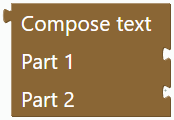
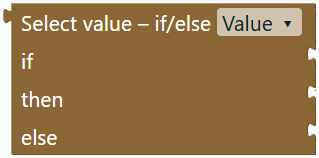
All these blocks are in Templates, without gears. Compose text produces message text. Time within period and Check value change return a Boolean and connect directly to “Only if”, “if”, “and” or “or”. Select value – if/else offers result types with matching sockets.
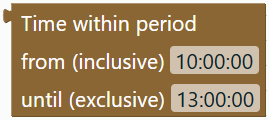
Time within period
Enter start and end as HH:MM or HH:MM:SS. The current HA local time is checked: start inclusive, end exclusive. With 10:00 and 13:00 this matches '10:00:00' <= now().strftime('%H:%M:%S') < '13:00:00'. 22:00 to 06:00 works across midnight. Equal boundaries return false. This is a condition, not a time trigger.
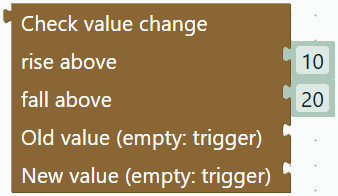
Check value change
Rise above 10, fall above 20 checks new value - old value > 10 or < -20. Enter the fall threshold as a positive magnitude. Exactly +10 or −20 does not satisfy the condition.
Leave Old value and New value empty to use trigger.from_state.state and trigger.to_state.state. This suits state triggers. A missing trigger or old state returns false, as do old unknown, unavailable and none. Alternatively connect values such as saved variables and System entity values. Both values use float(0), matching the example: nonnumeric text counts as 0. Missing new trigger values also count as 0. Check the new value separately if this is unsuitable.
Custom Jinja code
Jinja – custom code accepts a complete template for a value input; Jinja – custom condition accepts a complete Boolean template. Multiline {% if %}, {% set %} and {% else %} remain unchanged. Only a single {{ ... }} expression can be used as a Compose text part; attach complete statement templates directly to the destination.


Equivalent free-code entries have been removed from Jinja (experimental) and appear once in Templates. The experimental category retains the decomposable Jinja builder. Its parts edit Jinja expressions and do not represent additional HA actions. Older project blocks and imported original code remain readable.
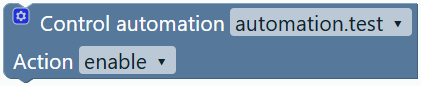
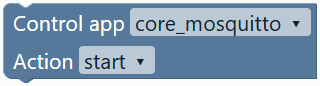
Control app and Control automation are in System. Since 0.1.64 they use two rows like ioBroker’s Control instance: selection above, Action below. HA apps and automation entities replace ioBroker instances.
System
Gear changes update the main block immediately: adding shows a row, removing hides it and adjusts the size, even while the popup remains open.
| Block | Purpose |
|---|---|
| Entity ID | Select an entity and connect its ID to another block. |
| Value of entity | Fixed HA selection: state, name, unit, attribute, last changed or last updated. |
| Value of entity ID | Connect an ID from an Entity ID, text or variable block. |
| Read once into variable | Save a snapshot, then execute the enclosed actions. This is not a trigger. The variable is also available to subsequent HA steps. |
| Control app | Start, stop or restart. Select installed apps through Supervisor or enter the slug manually. |
| Control automation | Enable, disable, toggle or run now. |



Select Attribute and enter its name; the appropriate row appears automatically. States are often text. Use Conversion → to number before calculations where needed. Missing attributes and timestamps yield none; a missing state yields HA's unknown. Fallback can handle these values.
The Control automation gear adds Connect entity ID, Check conditions and Stop running actions. A connected ID replaces the fixed selection. Condition checking applies to “run now”; stopping applies to “disable”. Without an explicit option, HA defaults apply: triggering skips conditions, disabling stops running actions. Enabling listens for triggers rather than immediately running actions.
Control app requires Supervisor and administrator privileges. The application receives read access to Supervisor for the selection list; start/stop/restart only happen when the exported automation executes in HA. Without Supervisor, the slug remains editable, but the action is unavailable there. Export: hassio.app_start, hassio.app_stop, hassio.app_restart with data.app.
Build a Template
- Attach Templates → Compose text to a text input such as “Message”.
- Connect ordinary Text directly to Part 1.
- Connect an Entity value from System or Number format directly to Part 2.
- Filling the final input automatically adds another socket. Top-to-bottom order determines output order. Empty inputs are skipped and retain their position for undo/redo.
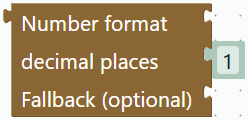
Example: text Temperature: → entity value sensor.temperature through Number format with the math number 1 for decimal places → text °C. Example result: Temperature: 21.6 °C.
| Addition | Meaning |
|---|---|
| Number format | 0–10 decimal places, using a decimal point. Use a math number for the count. Connect a fallback directly to its optional value input; invalid numbers otherwise produce empty text. |
| Value otherwise | Fallback for unknown, unavailable, none and empty text. Keeps 0 and false. |
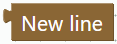
| New line | Starts a new line here. |
| Select value – if/else | Choose the result type: Value, Text, Number or Boolean. Connect a Boolean to “if” and matching values to “then” and “else”. Use Compose text for multiple text parts. Empty branches produce empty text for Value/Text; Number/Boolean require both branches. |
Attach formatting directly around the value it affects. Text, numbers, entity values, newlines and conditional values use value sockets; “if” accepts only Boolean blocks. Action chains cannot connect to these inputs. Jinja characters inside ordinary text remain literal text. Older Output chains automatically migrate to direct values when loaded in the editor, retaining branches and disabled parts. Old block types remain readable for project compatibility but are no longer listed in the menu.
Right-click → Template preview / Jinja shows generated code and asks HA to render current values. This is a snapshot, executes no actions and requires an accessible HA connection. Without a connection, the preview is explicitly unavailable. Credentials stay on the server. Project JSON preserves blocks, connections and gear choices. YAML contains native Jinja; YAML import may restore it as a free template block. HA may interpret pure numbers or lists in template results as native values.
References: HA automation actions, Supervisor, Jinja in HA.