
Energy – Widgets
Energy 0.1.0 is a separate external set for Grafik Visual Studio 0.1.255 or newer, independent of Industrial. Entity selection and live readings work in editor and runtime. Period selection changes the runtime dashboard locally without writing Home Assistant states.
Original project and attribution
The reference is ioBroker.vis-2-widgets-energy by bluefox / GermanBluefox and contributors, licensed under MIT. See the original documentation for the ioBroker version. Inspected revision: d0a53871, October 7, 2026.
Energy is an independent Home Assistant adaptation by rockbaer2007, not an unchanged port or an official ioBroker release. Rendering, icons and HA integration are newly implemented; original React/vis-2 code and images are not embedded. The package also includes attribution and license information.
Images
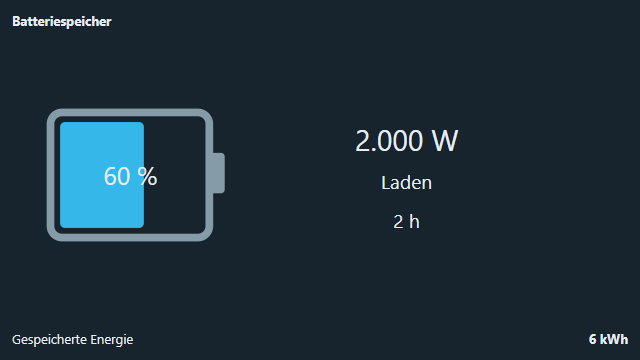
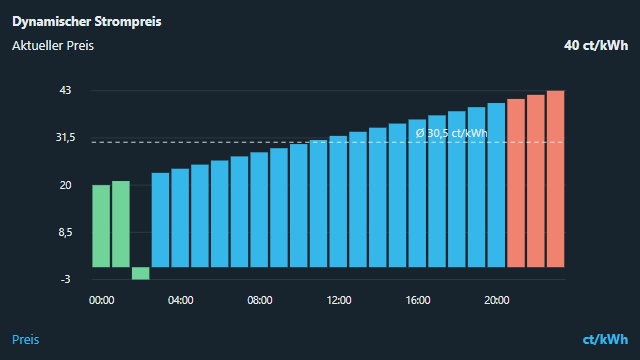
These runtime images use test data, not live measurements.
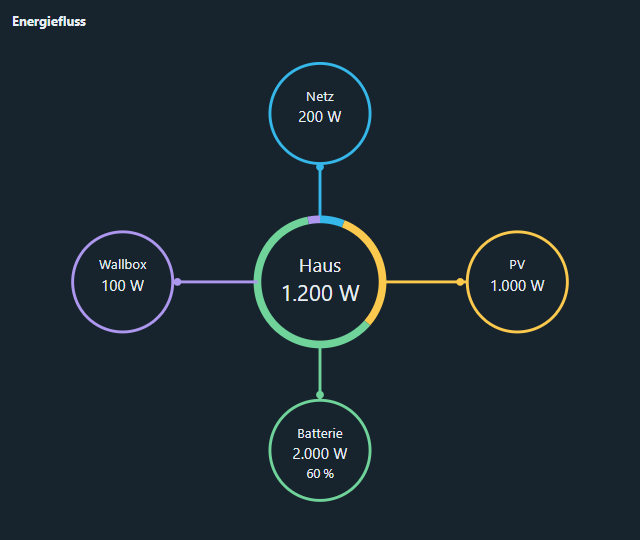
| Battery | Dynamic electricity price |
|---|---|
 |  |
Installation
- Update Studio to 0.1.255 or newer, then reload with Ctrl+F5.
- Download ugso.energy.wg.
- Install through Settings → Widget packages → Local. Energy appears in the palette.
- Insert a widget and use … to select its Home Assistant entities.
The package contains eight declarative widgets, original SVG palette icons and license/instructions, without executable package code. Source and package instructions.
The eight widgets
| Widget | Features and sources |
|---|---|
| Energy distribution | House and grid plus 1–10 additional nodes. Each has a name, color, power entity, factor, reversible flow and optional second reading/unit. Animation can be disabled. |
| Energy consumption | Up to six Recorder series, bar or line chart, counter differences or sums of individual consumption amounts; hourly/daily/monthly buckets by period. |
| Consumption comparison | Live values from up to six devices, bar/line/pie, sorting, per-series color and unit. Mixed units are not combined on one axis. |
| Period selector | Day/week/month/year, date and Previous/Today/Next. One selector can control multiple history widgets on the same page. |
| Self-sufficiency and self-consumption | Two rings from production, grid import/export and optional house consumption. Without a house entity it is calculated from the balance. |
| Battery storage | Charge, power, capacity, stored energy and estimated time to full/empty. Configurable charging sign and W/kW power. |
| Energy costs | Consumption × purchase price + base fee per calendar day − export revenue; live energy counters or Recorder period. Configurable currency. |
| Dynamic electricity price | JSON state or attribute, hourly bars, current/cheap/expensive hours and average. Negative prices are preserved. |
Units and unknown values
Set factors explicitly, e.g. 0.001 for Wh → kWh or W → kW. Power is not automatically integrated into energy. Self-sufficiency requires matching quantities and units: either power or energy from the same period.
Positive grid values mean import, negative values export. A configured separate export source replaces the negative grid component. Positive distribution node values flow toward the house by default; enable reverse flow for consumers or batteries using the opposite sign convention.
Missing or invalid sources show —, without fabricated preview measurements. Zero denominators produce unknown ratios. Remaining battery time is an estimate from current power and capacity, not a prediction of future operation.
Recorder and period selection
History and historical costs require numeric entities retained by the Home Assistant Recorder. Enter the selector widget ID from the same page in period selector ID, e.g. widget-3. Without a linked selector, the widget uses its own period/date. Empty date means today.
counter calculates differences from held Recorder states. Unknown states or counter resets create gaps; resets are not counted as consumption. sum adds individual consumption amounts and must not be used with cumulative counters. Current periods include only recorded data; future buckets stay unknown. Total costs require valid complete data in the already recorded part.
Limits: 366 days, six entities, 20,000 states per series. Excessive responses are rejected with a notice rather than silently truncated. Calendar boundaries use the local browser time zone. Older periods may be unavailable due to Recorder retention. This version has no HA long-term statistics, ioBroker history instances or automatic power integration. Base fees cover the selected calendar period; live counters must match that period.
Price data
Arrays can come from a state or selected attribute, optionally wrapped in prices, today, data, values or result. Automatic time fields: startsAt, start_timestamp, start, date, x; price fields: total, marketprice, price, value, y. Custom field names are supported. Times may be ISO, seconds or milliseconds. A numeric array represents hours starting at local midnight today.
Use factor 100 for EUR/kWh → ct/kWh or 0.1 for EUR/MWh → ct/kWh. Future-only mode, hour count, cheap/expensive hour counts and highlight colors are configurable.
Differences from the original
The eight widget categories follow the original concept, with settings and data integration adapted to Studio and Home Assistant. This first version uses local period selection and Recorder states rather than ioBroker OIDs/history. It does not reproduce all vis-2 layout/chart options or provide direct device writes.