
Calendar +
Calendar + 0.1.1 is an independent external widget set by rockbaer2007 for Grafik Visual Studio 0.1.267 or newer. It discovers all available Home Assistant calendars automatically and displays upcoming events as a compact card or expanded list. All calendars are enabled initially.
Runtime with sample data:
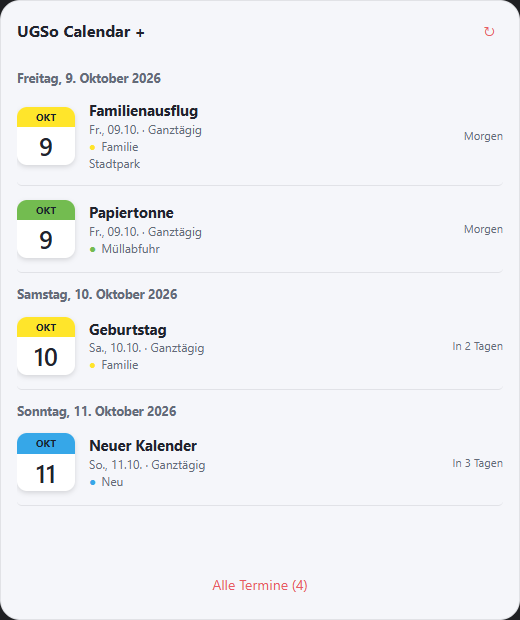
Original project
Inspired by calendar-card-plus by xBourner, published under the MIT license, Copyright (c) 2026 xBourner. Calendar + uses an independent Studio implementation and its own palette icon. No original source code or images are included. This set is independent of Industrial and the separately usable original Lovelace card.
Installation
- Update Studio to 0.1.267 or newer.
- Download ugso.calendar-plus.wg.
- Install under Settings → Widget packages → Local.
- Drag Calendar + → Calendar + from the palette onto the page.
The package contains declarative data, an icon, instructions and the MIT license. Studio provides the fixed calendar-plus host renderer; there are no executable package scripts. Source and package instructions.
My calendars
All available calendar.* entities are discovered, including calendars without a registry entry. Registry entries disabled in Home Assistant are omitted. My calendars provides a section for each calendar with its entity ID, a top-right checkbox to show/hide, Color and optional Background color. There is no manual calendar count.
From Studio 0.1.268, the section is named Tile settings (previously “Colors”). Calendar tile size offers four fixed sizes: Extra small 36 × 44 px, Small 44 × 52 px, Medium 58 × 64 px (default) and Large 76 × 82 px. Applies to the event list and details popup. Header text stays at least 12 px, day digits at least 24 px, independently of the general font size. Narrow widgets keep the selected size. Existing 0.1.0/0.1.1 installations receive the settings with the Studio update; reinstalling the package is unnecessary. The calendar has no data-flow settings or input/output points.
Visibility and colors are saved by entity ID. Newly discovered calendars are enabled automatically; hidden calendars are not queried for events. The number of discovered calendars is unlimited. Requests use batches of at most 20 calendars through the Home Assistant interface.
Settings
From Studio 0.1.270, Tile settings → Tile corner radius (px) controls all four date-tile corners together: 0 = square, default 10 px, maximum 100 px. Also applies to the details popup.
Calendar and Printer now expose all CSS sections under Properties → WIDGET: General CSS, CSS Font & Text, CSS background, CSS borders, and CSS shadow and spacing. The four additional groups start disabled to preserve the existing appearance. Enable a group's checkbox to configure fonts, background/image, borders, radius, shadows and spacing. Values style the actual card surface; the outer radius under CSS borders is separate from the small date-tile radius. Semantic colors such as calendar and printer status colors remain separate settings. General CSS stays active for position, size and visibility. No new package required.
From Studio 0.1.269, Tile settings also provides Top font size (month/weekday, up to 72 px) and Bottom font size (day number, up to 120 px). 0 = automatic uses the selected tile size defaults. Custom values may be smaller and are constrained when space is insufficient. Requested values stay saved, allowing larger tiles to use larger fonts again.
The colored header grows with its text and a little padding, up to one third of the tile height. The day number fits the remaining area. Tile dimensions stay unchanged. Settings apply to both event list and details popup; no new widget package is required.
| Section | Setting |
|---|---|
| Configuration | Heading, 1–90 days lookahead, 1–20 visible events, expand events, details popup, dividers. |
| Grouping | By day, additionally by calendar; optionally show empty days. |
| Upcoming events | Show/hide relative labels such as “Tomorrow”, “In 2 days” or “In progress”. |
| Text & visibility | Individually show/hide calendar name, date, location, duration, time and weekday; full/short weekday; swap month and weekday in the date tile. |
| Tile settings | Four tile sizes, automatic browser theme or fixed light/dark mode, accent color and 10–24 px font size. Per-calendar colors and backgrounds are configured separately. |
| Size | Default 480 × 460 px, minimum 260 × 180 px; the event list scrolls when space is limited. |
With the expanded list disabled, one event remains visible. In runtime, clicking an event or All events opens the details popup with up to 100 events. Full dates, location and description appear when available. Content is rendered as plain text. Close, Escape or clicking outside closes the popup.
Data and refresh
Editor and runtime read events through calendar.get_events. All-day events respect the exclusive end date; expired events are removed. Configuration → Refresh automatically (60 s) disables or enables periodic refresh (default: enabled). Runtime page entry loads fresh calendars and events even with automatic refresh disabled. ↻ still refreshes manually. Calendar discovery is refreshed as well.
Refresh replaces only event lists and preserves scroll positions and an open details popup. Unrelated live widget state changes do not rebuild an unchanged calendar. Leaving the page stops its refresh timer.
“No calendars found”, “All calendars hidden”, “No upcoming events” and a loading error are separate states. An error is not presented as an empty calendar. Language follows the Studio DE/EN setting automatically; custom headings and event content stay unchanged.
Scope of this version
This version reads events. New event, editing and deleting are not included yet. Calendars must be available in Home Assistant; there is no direct ICS/Google sign-in. Installing the original card through HACS is not required.